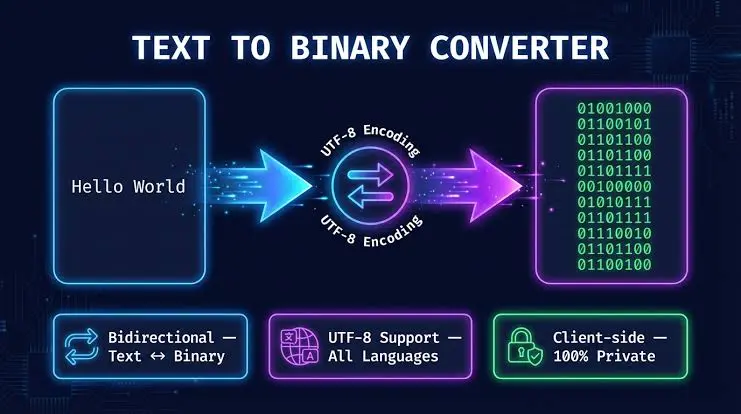
A binary to text chart helps you match binary numbers with readable ASCII letters, numbers, punctuation marks, and symbols. Instead of calculating every binary value manually, you can use the chart below to quickly identify what an 8-bit binary sequence represents. For example, 01000001 represents uppercase A, while 01100001 represents lowercase a.
Binary text conversion is commonly based on character-encoding systems such as ASCII. Standard ASCII uses 7 bits, while binary-to-text charts often display each ASCII value as an 8-bit byte by adding a leading zero. This makes binary sequences easier to group, read, and process in modern byte-oriented systems.
What Is a Binary to Text Chart?
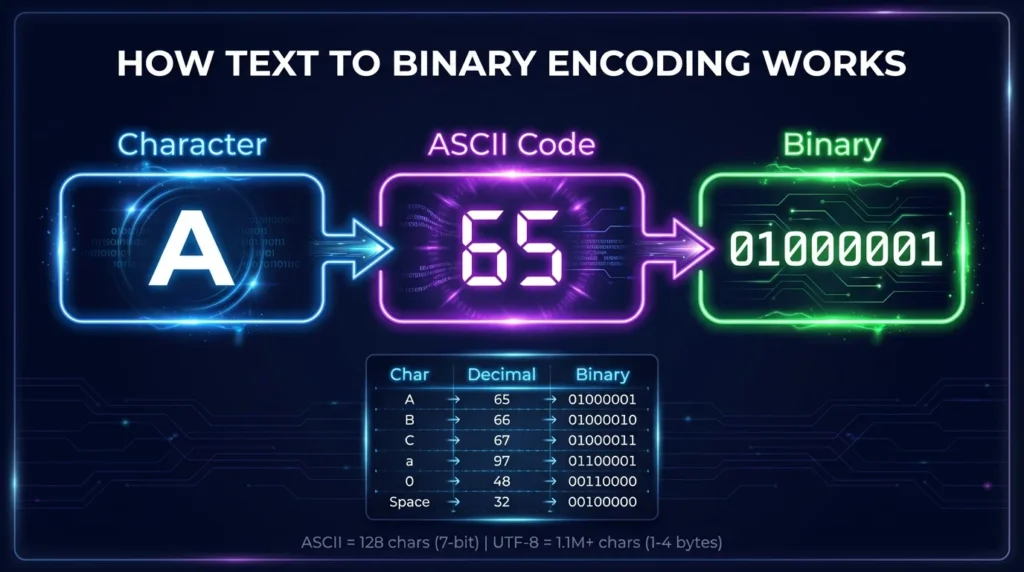
A binary to text chart is a reference table that connects binary values with their corresponding text characters. Each character has a numeric code, and that number can be represented in binary.
For example:
- A = Decimal 65 =
01000001 - B = Decimal 66 =
01000010 - a = Decimal 97 =
01100001 - 1 = Decimal 49 =
00110001 - Space = Decimal 32 =
00100000
This relationship makes it possible for computers to store, transmit, and interpret text as sequences of binary digits.
If you already have a long binary message and want an instant result, use our Binary to Text converter instead of decoding every byte manually.
How Does Binary Represent Text?
Computers work with binary digits known as bits. Each bit can have one of two values:
0 or 1
When multiple bits are grouped together, they can represent numbers. Character-encoding standards then assign those numbers to letters, digits, punctuation marks, and other characters.
For example, consider:
01000001
Its decimal value is:
64 + 1 = 65
In ASCII, decimal 65 represents uppercase A.
Therefore:
01000001 = A
ASCII is formally a 7-bit character code. For convenience, however, ASCII values are frequently shown inside an 8-bit byte with the highest bit set to zero.
Binary to Text Chart for Uppercase Letters A–Z
Use this binary alphabet chart to convert uppercase English letters from binary to readable text.
| Letter | Decimal | 8-Bit Binary | Hex |
|---|---|---|---|
| A | 65 | 01000001 | 41 |
| B | 66 | 01000010 | 42 |
| C | 67 | 01000011 | 43 |
| D | 68 | 01000100 | 44 |
| E | 69 | 01000101 | 45 |
| F | 70 | 01000110 | 46 |
| G | 71 | 01000111 | 47 |
| H | 72 | 01001000 | 48 |
| I | 73 | 01001001 | 49 |
| J | 74 | 01001010 | 4A |
| K | 75 | 01001011 | 4B |
| L | 76 | 01001100 | 4C |
| M | 77 | 01001101 | 4D |
| N | 78 | 01001110 | 4E |
| O | 79 | 01001111 | 4F |
| P | 80 | 01010000 | 50 |
| Q | 81 | 01010001 | 51 |
| R | 82 | 01010010 | 52 |
| S | 83 | 01010011 | 53 |
| T | 84 | 01010100 | 54 |
| U | 85 | 01010101 | 55 |
| V | 86 | 01010110 | 56 |
| W | 87 | 01010111 | 57 |
| X | 88 | 01011000 | 58 |
| Y | 89 | 01011001 | 59 |
| Z | 90 | 01011010 | 5A |
Binary to Text Chart for Lowercase Letters a–z
Uppercase and lowercase letters have different ASCII values. For example, uppercase A is decimal 65, while lowercase a is decimal 97.
| Letter | Decimal | 8-Bit Binary | Hex |
| a | 97 | 01100001 | 61 |
| b | 98 | 01100010 | 62 |
| c | 99 | 01100011 | 63 |
| d | 100 | 01100100 | 64 |
| e | 101 | 01100101 | 65 |
| f | 102 | 01100110 | 66 |
| g | 103 | 01100111 | 67 |
| h | 104 | 01101000 | 68 |
| i | 105 | 01101001 | 69 |
| j | 106 | 01101010 | 6A |
| k | 107 | 01101011 | 6B |
| l | 108 | 01101100 | 6C |
| m | 109 | 01101101 | 6D |
| n | 110 | 01101110 | 6E |
| o | 111 | 01101111 | 6F |
| p | 112 | 01110000 | 70 |
| q | 113 | 01110001 | 71 |
| r | 114 | 01110010 | 72 |
| s | 115 | 01110011 | 73 |
| t | 116 | 01110100 | 74 |
| u | 117 | 01110101 | 75 |
| v | 118 | 01110110 | 76 |
| w | 119 | 01110111 | 77 |
| x | 120 | 01111000 | 78 |
| y | 121 | 01111001 | 79 |
| z | 122 | 01111010 | 7A |
Binary Numbers 0–9 Chart
The characters 0 through 9 also have their own ASCII codes. Keep in mind that the text character 1 is different from the numeric binary value 1.
| Number Character | Decimal | 8-Bit Binary | Hex |
| 0 | 48 | 00110000 | 30 |
| 1 | 49 | 00110001 | 31 |
| 2 | 50 | 00110010 | 32 |
| 3 | 51 | 00110011 | 33 |
| 4 | 52 | 00110100 | 34 |
| 5 | 53 | 00110101 | 35 |
| 6 | 54 | 00110110 | 36 |
| 7 | 55 | 00110111 | 37 |
| 8 | 56 | 00111000 | 38 |
| 9 | 57 | 00111001 | 39 |
For example:
00110101
has the ASCII decimal value 53, which represents the text character:
5
This should not be confused with binary 0101, which represents the numeric decimal value 5 rather than the ASCII character "5".
Binary Symbols and Punctuation Chart
ASCII also assigns binary codes to spaces, punctuation marks, mathematical signs, brackets, and other commonly used symbols.
| Character | Decimal | 8-Bit Binary | Hex |
| Space | 32 | 00100000 | 20 |
| ! | 33 | 00100001 | 21 |
| “ | 34 | 00100010 | 22 |
| # | 35 | 00100011 | 23 |
| $ | 36 | 00100100 | 24 |
| % | 37 | 00100101 | 25 |
| & | 38 | 00100110 | 26 |
| ‘ | 39 | 00100111 | 27 |
| ( | 40 | 00101000 | 28 |
| ) | 41 | 00101001 | 29 |
| * | 42 | 00101010 | 2A |
| + | 43 | 00101011 | 2B |
| , | 44 | 00101100 | 2C |
| – | 45 | 00101101 | 2D |
| . | 46 | 00101110 | 2E |
| / | 47 | 00101111 | 2F |
| : | 58 | 00111010 | 3A |
| ; | 59 | 00111011 | 3B |
| < | 60 | 00111100 | 3C |
| = | 61 | 00111101 | 3D |
| > | 62 | 00111110 | 3E |
| ? | 63 | 00111111 | 3F |
| @ | 64 | 01000000 | 40 |
| [ | 91 | 01011011 | 5B |
| 92 | 01011100 | 5C | |
| ] | 93 | 01011101 | 5D |
| ^ | 94 | 01011110 | 5E |
| _ | 95 | 01011111 | 5F |
| ` | 96 | 01100000 | 60 |
| { | 123 | 01111011 | 7B |
| | | 124 | 01111100 | 7C |
| } | 125 | 01111101 | 7D |
| ~ | 126 | 01111110 | 7E |
How to Use a Binary to Text Chart
Converting binary into text manually is straightforward when the input is already divided into bytes.
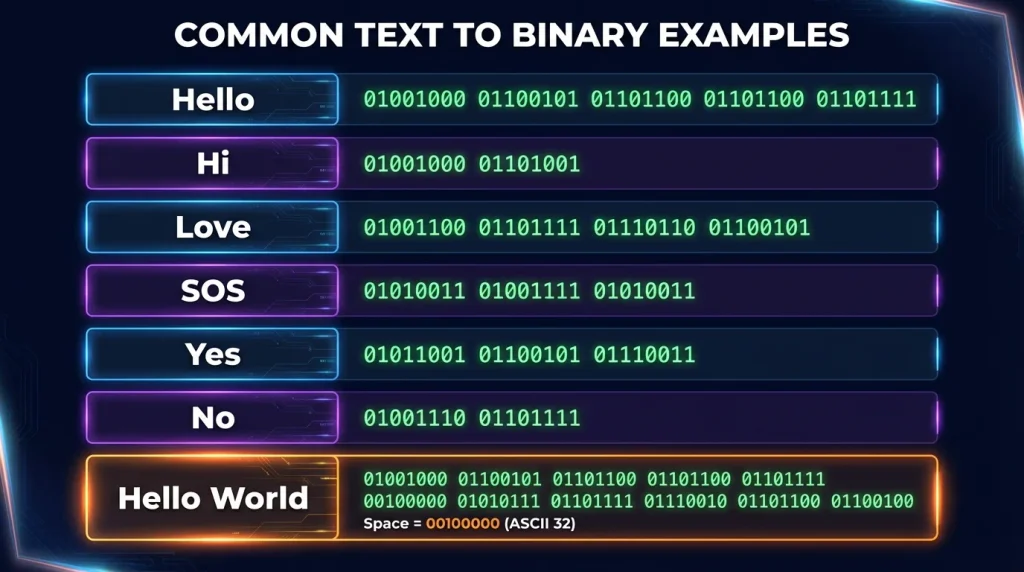
1. Split the Binary Code Into 8-Bit Groups
Suppose you have:
01001000 01101001
Separate it into:
01001000
01101001
Each group represents one byte.
2. Find Each Binary Value in the Chart
From the ASCII binary chart:
01001000 = H
01101001 = i
3. Combine the Characters
Put the decoded characters together:
Hi
So:
01001000 01101001
becomes:
Hi
For longer sequences, an automated binary translator is usually faster and reduces the chance of manual errors.
Binary to Text Example: HELLO
Here is another practical example.
Binary:
01001000 01000101 01001100 01001100 01001111
Break it into individual values:
| Binary | Character |
01001000 | H |
01000101 | E |
01001100 | L |
01001100 | L |
01001111 | O |
Result:
HELLO
The same process works for lowercase letters, numbers, spaces, and standard ASCII punctuation.
Binary to Text Example: Hello World!
Consider:
01001000 01100101 01101100 01101100 01101111 00100000 01010111 01101111 01110010 01101100 01100100 00100001
The bytes decode as:
H e l l o [space] W o r l d !
Result:
Hello World!
Notice the byte:
00100000
This represents a space. Missing spaces are one common reason manually decoded binary messages appear as a continuous string of words.
What Is ASCII?
ASCII stands for American Standard Code for Information Interchange. It defines numeric codes for letters, digits, control characters, punctuation, and other symbols.
Standard ASCII uses seven bits, allowing values from:
0 to 127
That gives a total of 128 possible values.
When ASCII is displayed in an 8-bit binary chart, a leading zero can be added to the 7-bit value. RFC 20 specifically describes standard 7-bit ASCII embedded in an 8-bit byte with its high-order bit set to zero.
For example:
7-bit ASCII for A:
1000001
8-bit representation:
01000001
Both represent the same ASCII value: decimal 65.
ASCII vs UTF-8 for Binary Text
ASCII is sufficient for basic English letters, digits, and common punctuation, but modern digital text often contains characters from many languages.
That is where Unicode and encodings such as UTF-8 become important.
UTF-8 uses 8-bit code units and preserves the complete ASCII range. Unicode code points U+0000 through U+007F are encoded in UTF-8 using the same byte values as ASCII.
For example:
A
ASCII:
01000001
UTF-8:
01000001
The value is identical.
However, characters outside standard ASCII may require multiple UTF-8 bytes. This means a simple ASCII binary chart is ideal for English letters, numbers, and standard symbols, but it does not represent every character used by every language.
Why Are Most Binary Text Values Shown as 8 Bits?
A bit is one binary digit.
A byte is normally eight bits.
Because modern computer systems commonly process data in bytes, binary text is frequently displayed in groups of eight bits even when the underlying ASCII character set requires only seven significant bits.
For example:
01000010
contains eight bits and represents:
B
Grouping data into fixed-size bytes also makes long binary sequences easier to separate and decode.
Compare:
0100100001100101011011000110110001101111
with:
01001000 01100101 01101100 01101100 01101111
Both can contain the same binary data, but the second form is much easier for a person to decode because the byte boundaries are visible.
Binary to Text Without Spaces
You may sometimes receive binary text without spaces, such as:
0100100001100101
If the data uses 8-bit ASCII or UTF-8 bytes, divide the sequence every eight digits:
01001000 01100101
Then decode:
01001000 = H
01100101 = e
Result:
He
This works reliably only when you know the expected encoding and byte boundaries. Randomly inserting spaces into an unknown binary sequence can produce incorrect results.
What Happens With Short Binary Values Such as 0110?
A value such as:
0110
is only four bits long.
As a regular binary number:
0110 = 6
But it is not automatically the printable text character 6.
The ASCII character "6" is:
00110110
This distinction is important when searching for values such as 0110 binary to text, 0111 binary to text, or 1001 binary to text. A short binary number and an encoded text character are not necessarily the same thing.
To decode text accurately, first determine whether the input represents:
- a numeric binary value;
- an ASCII character;
- a sequence of 8-bit bytes;
- UTF-8 encoded text; or
- another character encoding.
Binary Number vs Binary Character
Binary numbers and binary text may look similar but serve different purposes.
For example:
Binary number:
1001
Decimal:
9
ASCII text character 9:
00111001
Therefore:
1001 means decimal 9 when interpreted as a binary number.
00111001 means the character “9” when interpreted using ASCII.
Understanding the intended encoding prevents incorrect binary-to-text conversions.
Common Binary to Text Conversion Mistakes
Using Incorrect Byte Lengths
ASCII text is commonly presented as 8-bit groups. If your binary values have different lengths, identify the format before converting them.
Ignoring Spaces
A text space has its own ASCII code:
00100000
Removing it can make separate words appear joined together.
Confusing Numbers With Text Characters
Binary 1 as a numeric value is not the same as ASCII character "1".
ASCII "1" is:
00110001
Using the Wrong Character Encoding
ASCII works well for basic English text, but Unicode characters outside the ASCII range can require multi-byte UTF-8 sequences.
Missing or Adding Bits
One missing zero or one can completely change a character.
For example:
01000001 = A
while:
01000010 = B
Only the final bit changed, but the decoded letter is different.
When Is a Binary to Text Chart Useful?
A binary code chart can be useful for:
- understanding how computers represent text;
- checking binary conversion results;
- studying ASCII and character encoding;
- solving programming exercises;
- decoding short binary messages;
- learning the relationship between binary and decimal numbers;
- teaching computer science concepts;
- identifying binary representations of letters;
- checking spaces and punctuation;
- debugging simple encoded text.
For long binary sequences, using a dedicated Binary to Text Converter is generally more practical than searching the chart one byte at a time.
Quick Binary Letter Reference
Some frequently searched binary letter codes include:
| Character | Binary |
| A | 01000001 |
| B | 01000010 |
| C | 01000011 |
| H | 01001000 |
| I | 01001001 |
| M | 01001101 |
| S | 01010011 |
| Z | 01011010 |
| a | 01100001 |
| e | 01100101 |
| h | 01101000 |
| i | 01101001 |
| o | 01101111 |
| s | 01110011 |
| z | 01111010 |
Frequently Asked Questions
What is a binary to text chart?
A binary to text chart is a table that maps binary values to readable characters. It is commonly used to look up ASCII letters, numbers, punctuation marks, and symbols.
What is the binary code for A?
Uppercase A has ASCII decimal value 65. Its 8-bit binary representation is:
01000001
What is the binary code for lowercase a?
Lowercase a has ASCII decimal value 97. Its binary representation is:
01100001
What is the binary code for a space?
A standard ASCII space has decimal value 32 and binary value:
00100000
Is ASCII 7-bit or 8-bit?
Standard ASCII is a 7-bit character encoding. Its values can also be placed inside 8-bit bytes by adding a leading zero, which is why many binary ASCII charts show eight digits per character.
Are ASCII and UTF-8 the same?
No. ASCII is a smaller character set, while UTF-8 can encode the wider Unicode character repertoire. However, UTF-8 preserves ASCII byte values for the ASCII range, making standard ASCII text compatible with UTF-8.
How do I convert binary to text manually?
Divide the binary data into appropriate byte groups, look up each byte in an ASCII or relevant encoding chart, and join the resulting characters in order.
For example:
01001000 01101001
becomes:
Hi
Can binary represent symbols?
Yes. ASCII includes codes for punctuation and symbols such as !, @, #, $, %, brackets, mathematical signs, and spaces.
For example:
00100001 = !
01000000 = @
00100011 = #
Why does my binary code produce unreadable text?
The input may contain control characters, incorrect byte boundaries, missing bits, an unsupported encoding, or data that was never intended to represent text. Confirm the encoding before assuming every binary value should produce a printable character.
Final Thoughts
A Binary to Text Chart provides a quick way to understand how ASCII letters, numbers, spaces, and symbols are represented using binary values. Once you understand the relationship between binary, decimal values, and character encoding, decoding short binary messages becomes much easier.
Use the tables above when you need to check individual values manually. For larger messages or continuous binary strings, use a Binary to Text converter to decode the complete sequence quickly while preserving letters, numbers, spaces, and supported symbols.