
Binary to Text examples make binary decoding easier by showing exactly how groups of zeros and ones become readable letters, words, numbers, spaces, and messages. Each binary group can represent a character when interpreted through an encoding such as ASCII, allowing simple binary sequences to form meaningful text.
This article provides examples for uppercase and lowercase letters, words, numbers, symbols, spaces, and messages. You will also see how to group binary bytes, verify character values, and avoid common decoding mistakes.
What Is Binary to Text?
Binary to Text is the process of interpreting binary values as readable characters through a character encoding such as ASCII or UTF-8.
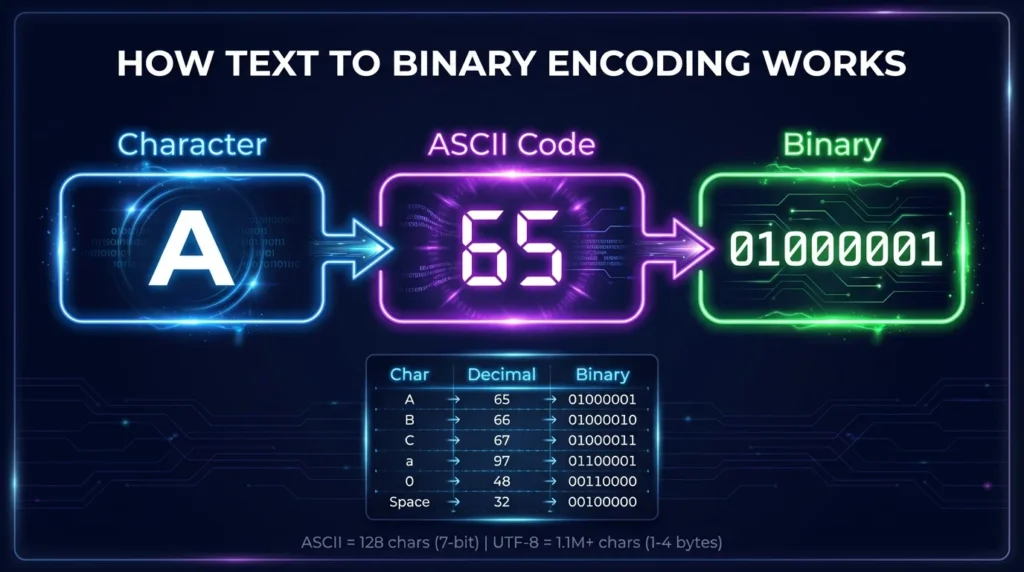
For basic ASCII examples, an 8-bit binary group can represent a letter, number, space, or punctuation mark.
For example:
01000001
represents decimal:
65
ASCII decimal 65 represents:
A
Therefore:
01000001 = A
A series of these binary values can create complete words and messages.
How Do Binary to Text Examples Work?
For simple ASCII text, you can think of the process as:
Binary → Decimal → Character
For example:
01000010
has decimal value:
66
ASCII decimal 66 is:
B
So:
01000010 = B
When several binary bytes appear together, decode them individually and combine the resulting characters in their original order.
Binary to Text Examples for Uppercase Letters
Uppercase letters A through Z have ASCII values from 65 through 90.
Here are some useful examples:
| Letter | Decimal | Binary |
|---|---|---|
| A | 65 | 01000001 |
| B | 66 | 01000010 |
| C | 67 | 01000011 |
| D | 68 | 01000100 |
| E | 69 | 01000101 |
| F | 70 | 01000110 |
| G | 71 | 01000111 |
| H | 72 | 01001000 |
| I | 73 | 01001001 |
| J | 74 | 01001010 |
| K | 75 | 01001011 |
| L | 76 | 01001100 |
| M | 77 | 01001101 |
| N | 78 | 01001110 |
| O | 79 | 01001111 |
| P | 80 | 01010000 |
| Q | 81 | 01010001 |
| R | 82 | 01010010 |
| S | 83 | 01010011 |
| T | 84 | 01010100 |
| U | 85 | 01010101 |
| V | 86 | 01010110 |
| W | 87 | 01010111 |
| X | 88 | 01011000 |
| Y | 89 | 01011001 |
| Z | 90 | 01011010 |
Example: Binary Code for A
Binary:
01000001
Decimal:
65
Character:
A
Example: Binary Code for Z
Binary:
01011010
Decimal:
90
Character:
Z
Binary to Text Examples for Lowercase Letters
Lowercase letters use different ASCII values from uppercase letters.
| Letter | Decimal | Binary |
| a | 97 | 01100001 |
| b | 98 | 01100010 |
| c | 99 | 01100011 |
| d | 100 | 01100100 |
| e | 101 | 01100101 |
| f | 102 | 01100110 |
| g | 103 | 01100111 |
| h | 104 | 01101000 |
| i | 105 | 01101001 |
| j | 106 | 01101010 |
| k | 107 | 01101011 |
| l | 108 | 01101100 |
| m | 109 | 01101101 |
| n | 110 | 01101110 |
| o | 111 | 01101111 |
| p | 112 | 01110000 |
| q | 113 | 01110001 |
| r | 114 | 01110010 |
| s | 115 | 01110011 |
| t | 116 | 01110100 |
| u | 117 | 01110101 |
| v | 118 | 01110110 |
| w | 119 | 01110111 |
| x | 120 | 01111000 |
| y | 121 | 01111001 |
| z | 122 | 01111010 |
Example: Uppercase A vs Lowercase a
Uppercase A:
01000001
Lowercase a:
01100001
These values are different because ASCII treats uppercase and lowercase letters as separate characters.
Binary to Text Examples for Short Words
Words are created by placing the binary code for each letter in sequence.
Binary to Text Example: CAT
Binary:
01000011 01000001 01010100
Conversion:
| Binary | Character |
01000011 | C |
01000001 | A |
01010100 | T |
Result:
CAT
Binary to Text Example: DOG
Binary:
01000100 01001111 01000111
Conversion:
| Binary | Character |
01000100 | D |
01001111 | O |
01000111 | G |
Result:
DOG
Binary to Text Example: SUN
Binary:
01010011 01010101 01001110
Conversion:
| Binary | Character |
01010011 | S |
01010101 | U |
01001110 | N |
Result:
SUN
Binary to Text Example: HELLO
The word HELLO can be represented as:
01001000 01000101 01001100 01001100 01001111
Decode each byte:
| Binary | Decimal | Character |
01001000 | 72 | H |
01000101 | 69 | E |
01001100 | 76 | L |
01001100 | 76 | L |
01001111 | 79 | O |
Final result:
HELLO
Binary to Text Example: hello
Lowercase hello uses different binary values:
01101000 01100101 01101100 01101100 01101111
| Binary | Character |
01101000 | h |
01100101 | e |
01101100 | l |
01101100 | l |
01101111 | o |
Result:
hello
This shows why character case matters during binary decoding.
Binary to Text Examples With Spaces
A space is also represented by a character code.
In ASCII:
Space = Decimal 32
Binary:
00100000
Example: HI THERE
Binary:
01001000 01001001 00100000 01010100 01001000 01000101 01010010 01000101
The important separator is:
00100000 = Space
The complete result is:
HI THERE
Without the space byte, the output would become:
HITHERE
Binary to Text Examples With Numbers
Numbers displayed as characters also have ASCII values.
| Character | Decimal | Binary |
| 0 | 48 | 00110000 |
| 1 | 49 | 00110001 |
| 2 | 50 | 00110010 |
| 3 | 51 | 00110011 |
| 4 | 52 | 00110100 |
| 5 | 53 | 00110101 |
| 6 | 54 | 00110110 |
| 7 | 55 | 00110111 |
| 8 | 56 | 00111000 |
| 9 | 57 | 00111001 |
Example: Binary Code for 123
Binary:
00110001 00110010 00110011
Conversion:
00110001 = 1
00110010 = 2
00110011 = 3
Result:
123
Binary Number vs Binary Text Number
A numeric binary value is not the same as the ASCII character used to display that number.
For example:
0101
as a binary number equals:
5
But the ASCII text character 5 is:
00110101
So:
| Binary | Interpretation | Result |
0101 | Binary number | Decimal 5 |
00110101 | ASCII text | Character “5” |
This distinction is essential when decoding binary examples.
Binary to Text Examples With Symbols
ASCII can also represent punctuation and common symbols.
| Symbol | Decimal | Binary |
| Space | 32 | 00100000 |
| ! | 33 | 00100001 |
| # | 35 | 00100011 |
| $ | 36 | 00100100 |
| % | 37 | 00100101 |
| & | 38 | 00100110 |
| + | 43 | 00101011 |
| – | 45 | 00101101 |
| . | 46 | 00101110 |
| ? | 63 | 00111111 |
| @ | 64 | 01000000 |
Example: Hi!
Binary:
01001000 01101001 00100001
Decode:
01001000 = H
01101001 = i
00100001 = !
Result:
Hi!
Binary to Text Message Examples
Longer binary sequences can represent complete phrases and messages.
Example: Hello World
Binary:
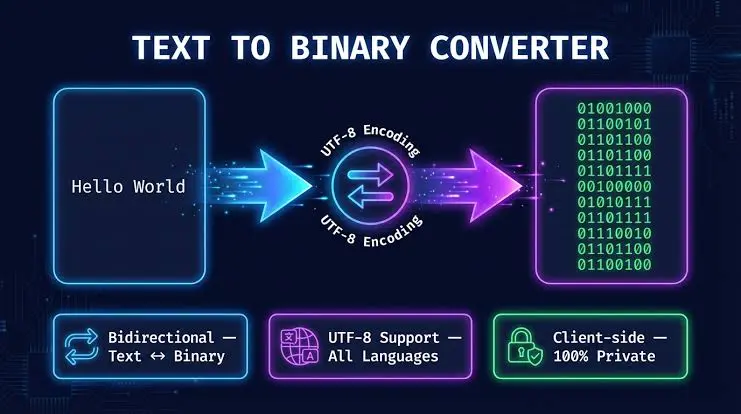
01001000 01100101 01101100 01101100 01101111 00100000 01010111 01101111 01110010 01101100 01100100
Result:
Hello World
Example: I LOVE YOU
Binary:
01001001 00100000 01001100 01001111 01010110 01000101 00100000 01011001 01001111 01010101
Breakdown:
01001001 = I
00100000 = Space
01001100 = L
01001111 = O
01010110 = V
01000101 = E
00100000 = Space
01011001 = Y
01001111 = O
01010101 = U
Result:
I LOVE YOU
Example: TEST 123
Binary:
01010100 01000101 01010011 01010100 00100000 00110001 00110010 00110011
Result:
TEST 123
This example combines letters, a space, and numeric characters.
How to Decode Binary Messages Step by Step
You can decode simple ASCII-based binary messages manually.
Step 1: Identify the Byte Groups
Example:
01000001 01000010 01000011
Each group contains eight bits.
Step 2: Convert Each Byte to Decimal
01000001 = 65
01000010 = 66
01000011 = 67
Step 3: Match Decimal Values With ASCII
65 = A
66 = B
67 = C
Step 4: Join the Characters
Result:
ABC
Binary to Text Without Spaces Between Binary Bytes
You may encounter:
0100100001100101011011000110110001101111
If you know the sequence contains 8-bit character bytes, divide it every eight bits:
01001000 01100101 01101100 01101100 01101111
Now decode each group:
H e l l o
Result:
Hello
Why Correct Grouping Matters
If one binary digit is missing or added, every later byte boundary can shift.
That can produce completely different characters.
Do not divide an unknown binary sequence into eight-bit groups unless you have reason to believe it uses byte-oriented text.
Common 8-Bit Binary Examples
Here are several useful values to recognize:
| Binary | Character |
01000001 | A |
01000010 | B |
01001000 | H |
01001001 | I |
01010011 | S |
01010100 | T |
01100001 | a |
01100101 | e |
01101001 | i |
01101111 | o |
00100000 | Space |
00100001 | ! |
00110001 | 1 |
00111111 | ? |
These values are useful when manually checking short binary messages.
Why Do Binary Examples Often Use 8 Bits?
Standard ASCII is a 7-bit character encoding, covering values from 0 through 127.
However, ASCII values are often displayed in an 8-bit byte with a leading zero.
For example:
7-bit A:
1000001
8-bit representation:
01000001
Both represent decimal 65 and the character:
A
Using eight digits makes byte boundaries easier to identify in longer binary strings.
Does Every 8-Bit Binary Value Become Readable Text?
No.
An 8-bit byte can contain values from 0 through 255.
Standard ASCII only defines values from 0 through 127, and some of those values are non-printable control characters.
Binary data can also represent:
- images;
- audio;
- video;
- executable instructions;
- compressed data;
- encrypted information;
- numeric values.
A binary sequence produces meaningful text only when the data and character encoding are interpreted correctly.
ASCII vs UTF-8 in Binary Messages
Basic binary examples often use ASCII because common English letters and symbols are easy to demonstrate.
UTF-8 supports the much larger Unicode character set.
ASCII Characters in UTF-8
ASCII-range characters retain the same byte values in UTF-8.
For example:
01000001 = A
Characters Beyond ASCII
Many Unicode characters require multiple UTF-8 bytes.
Therefore, an ASCII binary chart cannot decode every possible language character or symbol.
When a binary message contains non-ASCII text, the correct character encoding becomes especially important.
Common Binary Decoding Mistakes
Confusing Uppercase and Lowercase Letters
01000001 = A
while:
01100001 = a
They are different characters.
Confusing Numeric Values With Text Numbers
0101
means decimal 5.
00110101
represents character "5" in ASCII.
Ignoring Spaces
00100000
represents a space.
Missing this value can combine separate words.
Using the Wrong Byte Boundaries
Incorrect grouping can change the complete decoded message.
Assuming Every Binary Sequence Is Text
Binary may contain many types of digital data, so readable output is not guaranteed.
How to Verify Binary to Text Examples
If a decoded example looks wrong, check it systematically.
Check the Number of Bits
Make sure each intended byte contains the expected number of bits.
Verify the Decimal Value
Recalculate the binary number if necessary.
For example:
01000001
equals:
64 + 1 = 65
Check the ASCII Character
ASCII decimal 65 is:
A
Check Letter Case
Uppercase and lowercase values differ.
Check Spaces and Symbols
Do not ignore punctuation or space bytes when decoding a message.
Manual Examples vs a Binary to Text Converter
Manual examples are useful because they show how the conversion actually works.
Manual Decoding Is Useful For
- learning ASCII;
- understanding bits and bytes;
- checking short binary strings;
- studying computer science;
- verifying individual values.
A Converter Is Better For
- long binary messages;
- many characters;
- continuous binary strings;
- faster results;
- reducing manual calculation errors.
A Binary to Text converter automates the same basic interpretation process when the input encoding is supported.
Frequently Asked Questions
What Is a Simple Binary to Text Example?
A simple example is:
01000001
In ASCII, this binary value represents:
A
What Is Hello in Binary?
Hello in commonly displayed 8-bit ASCII form is:
01001000 01100101 01101100 01101100 01101111
What Is Hi in Binary?
Hi is:
01001000 01101001
What Is a Space in Binary Text?
An ASCII space has decimal value 32 and binary representation:
00100000
How Are Words Represented in Binary?
Each character is encoded individually and the binary values are placed in sequence. Spaces and punctuation also require their own encoded values.
Can Binary to Text Include Numbers and Symbols?
Yes. Character encodings such as ASCII include numeric characters, spaces, punctuation, and common symbols in addition to letters.
How Do I Decode a Binary Message Without Spaces?
If you know the input uses 8-bit bytes, divide the sequence every eight digits and decode each group. If the encoding is unknown, avoid assuming the grouping.
Why Does My Binary Message Not Produce Readable Text?
The input may use incorrect byte boundaries, another encoding, control characters, missing bits, or data that was never intended to represent text.
Final Thoughts
Binary to Text examples are one of the easiest ways to understand how binary values become readable letters, words, numbers, spaces, symbols, and complete messages. By examining each byte and matching it with the correct character value, you can see exactly how encoded text is constructed.