Binary to Text conversion changes binary code into readable characters, while binary to decimal conversion turns binary numbers into ordinary base-10 values. Although both processes begin with zeros and ones, they answer different questions and produce different types of results.
Understanding this difference helps you choose the correct method for decoding messages, calculating binary values, or checking computer data. This article compares both conversions with clear examples, practical steps, tables, and common mistakes so you can interpret binary accurately correctly.
What Is the Difference Between Binary to Text and Binary to Decimal?
The main difference is the type of output produced.
Binary to decimal interprets a binary sequence as a number and converts it into its equivalent decimal value.
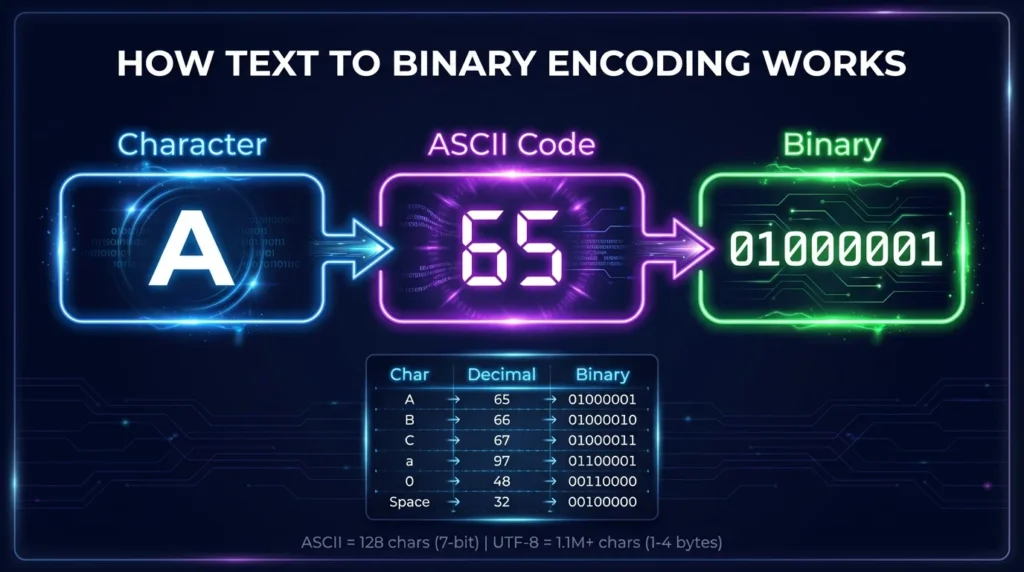
Binary to Text interprets binary data according to a character encoding such as ASCII or UTF-8 and produces readable characters.
For example:
01000001
can be interpreted in two ways.
As a binary number:
01000001 = 65
As ASCII text:
01000001 = A
The binary digits are identical, but the intended interpretation changes the final result.
Binary to Text vs Binary to Decimal at a Glance
| Feature | Binary to Text | Binary to Decimal |
|---|---|---|
| Input | Binary code | Binary number |
| Output | Letters, numbers, symbols, text | Decimal number |
| Common Use | Decoding encoded text | Calculating numeric values |
| Requires Encoding | Usually yes | No character encoding needed |
| Common Standard | ASCII, UTF-8 | Base-2 to base-10 |
| Example | 01000001 → A | 01000001 → 65 |
| Result Type | Character or string | Number |
This table shows why the two conversions should not be treated as the same operation.
What Is Binary to Text?
Binary to Text is the process of interpreting binary values as encoded characters.
Character encodings assign numbers to letters, digits, spaces, punctuation, and other characters.
ASCII is commonly used in basic examples.
Binary to Text Example
Consider:
01001000
Its decimal value is:
72
ASCII decimal 72 represents:
H
Therefore:
01001000 = H
Now consider:
01101001
Its decimal value is:
105
ASCII decimal 105 represents:
i
Put the two bytes together:
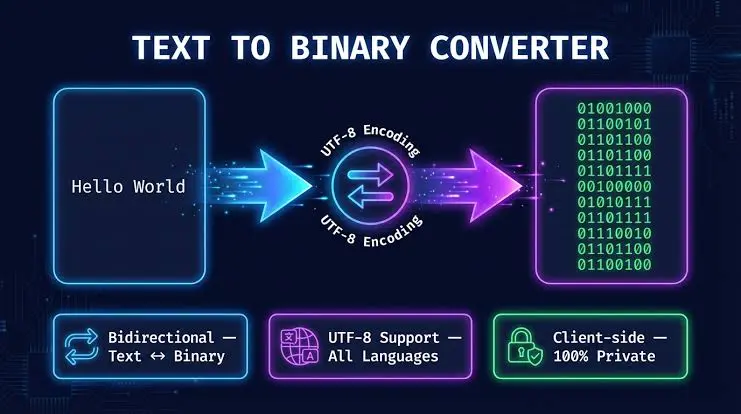
01001000 01101001
Result:
Hi
The purpose of this conversion is to obtain readable text rather than simply calculate numbers.
What Is Binary to Decimal?
Binary to decimal conversion changes a base-2 binary number into its equivalent base-10 value.
Binary uses only:
0
and:
1
Decimal uses ten digits:
0–9
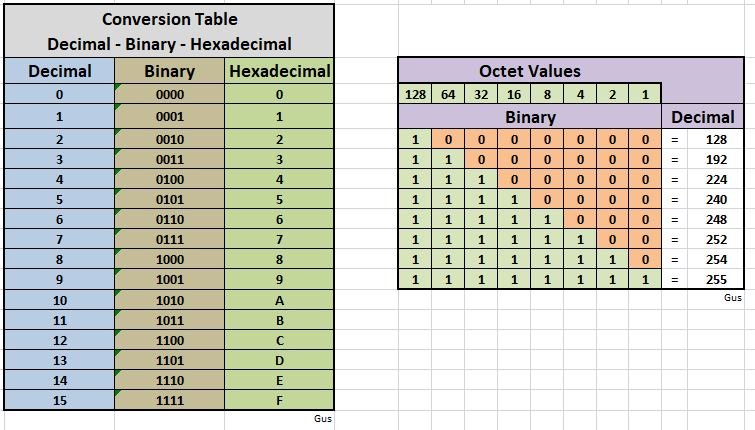
Each binary position represents a power of two.
Binary Place Values
For an 8-bit binary number:
| Position | Decimal Value |
10000000 | 128 |
01000000 | 64 |
00100000 | 32 |
00010000 | 16 |
00001000 | 8 |
00000100 | 4 |
00000010 | 2 |
00000001 | 1 |
To convert binary into decimal, add the place values corresponding to digits containing 1.
How to Convert Binary to Decimal
The process does not require ASCII or another character encoding.
Step 1: Write the Binary Number
Example:
10101
Step 2: Match Each Digit With Its Place Value
The relevant values are:
16 8 4 2 1
Binary:
1 0 1 0 1
Step 3: Add the Active Values
The 1 digits occur at:
16
4
and:
1
So:
16 + 4 + 1 = 21
Therefore:
10101 = 21
The result is a number, not a character.
How to Convert Binary to Text
Binary text conversion requires one additional interpretation step.
For basic ASCII text:
Binary → Decimal → Character
Step 1: Separate the Binary Into Bytes
Consider:
01000001 01000010 01000011
There are three 8-bit groups.
Step 2: Convert Each Byte Into Decimal
01000001 = 65
01000010 = 66
01000011 = 67
Step 3: Match the Values With ASCII Characters
ASCII:
65 = A
66 = B
67 = C
Step 4: Combine the Characters
Result:
ABC
Binary to decimal stops at the numeric values:
65 66 67
Binary to Text continues by interpreting those values as characters.
Same Binary Input but Different Results
One of the easiest ways to understand the difference is to use the same input.
Take:
00110101
Binary to Decimal Result
The active values are:
32 + 16 + 4 + 1
Result:
53
Therefore:
00110101 = 53
Binary to Text Result
If interpreted as ASCII:
Decimal 53 represents:
5
Therefore:
00110101 = "5"
The binary input is identical.
The difference comes from what you want the value to represent.
Why Binary 0101 Is Not the Same as ASCII “5”
This is a common source of confusion.
Binary:
0101
is a numeric binary representation of decimal:
5
But the text character:
5
has ASCII decimal value:
53
Its 8-bit binary form is:
00110101
So:
| Binary | Interpretation | Result |
0101 | Binary number | 5 |
00110101 | ASCII character | “5” |
A number and the character used to display that number are different forms of data.
Binary Numbers vs Binary Characters
Binary numbers represent numeric quantities.
Binary characters represent encoded character values.
For example:
1000001
as a binary number equals:
65
If that value is interpreted using ASCII, it represents:
A
Why Context Matters
The binary sequence itself does not tell you everything about its meaning.
You need to know whether the data represents:
- a number;
- text;
- image data;
- audio;
- machine instructions;
- compressed information;
- another data format.
The same bits can be interpreted differently depending on context.
Does Binary to Text Always Use ASCII?
No.
ASCII is commonly used for simple English-language examples, but Binary to Text conversion can involve different character encodings.
Common encodings include:
- ASCII;
- UTF-8;
- UTF-16;
- other legacy or specialized encodings.
ASCII
ASCII defines values from 0 through 127 and includes basic English letters, digits, punctuation, spaces, and control characters.
UTF-8
UTF-8 supports the much larger Unicode character set.
ASCII-range characters use the same byte values in UTF-8, but many other characters require multiple bytes.
Therefore, knowing the correct encoding is important when converting binary into readable text.
Does Binary to Decimal Require an Encoding?
No.
Binary to decimal conversion is mathematical.
It simply converts a number from base 2 into base 10.
For example:
1111
uses place values:
8 + 4 + 2 + 1
Result:
15
No ASCII, UTF-8, or character mapping is required.
Binary to Text Example With a Word
Consider:
01000100 01001111 01000111
Convert each value:
| Binary | Decimal | ASCII |
01000100 | 68 | D |
01001111 | 79 | O |
01000111 | 71 | G |
Binary to Text result:
DOG
If you perform only binary-to-decimal conversion, the result would be:
68 79 71
Both results are correct, but they answer different questions.
Binary to Decimal Example With the Same Bytes
Take:
01000100
Binary to decimal:
64 + 4 = 68
Result:
68
If interpreted as ASCII:
68 = D
This shows the relationship:
Binary → Decimal → Text Character
Binary to decimal is often an intermediate stage in manual Binary to Text conversion.
How Spaces Work in Binary to Text
A space is also a character.
In ASCII:
Space = decimal:
32
Binary:
00100000
Consider:
01001000 01101001 00100000 01000001
Convert the bytes:
01001000 = H
01101001 = i
00100000 = Space
01000001 = A
Result:
Hi A
If you converted only to decimal, you would get:
72 105 32 65
The numeric values alone do not show the readable message unless you interpret them using the character encoding.
How Symbols Work in Binary to Text
Symbols also have assigned character codes.
Examples:
| Character | Decimal | Binary |
| ! | 33 | 00100001 |
| # | 35 | 00100011 |
| $ | 36 | 00100100 |
| ? | 63 | 00111111 |
| @ | 64 | 01000000 |
For example:
01001000 01101001 00100001
becomes:
Hi!
Binary to decimal would instead produce:
72 105 33
Binary to Text Without Spaces Between Bytes
Binary text may appear as one continuous string.
Example:
010000010100001001000011
If you know the input contains 8-bit ASCII bytes, divide it into groups of eight:
01000001 01000010 01000011
Then decode:
65 = A
66 = B
67 = C
Result:
ABC
For binary to decimal, the same continuous sequence could instead be treated as one large binary number, producing a completely different numeric result.
This is another reason context and grouping matter.
Why Byte Grouping Matters for Binary to Text
Character data is commonly processed in bytes.
If a binary text string is split incorrectly, every following character may become wrong.
Correct:
01000001 01000010
Result:
AB
If the boundaries shift, those exact character values are lost.
Binary-to-decimal calculations do not necessarily require 8-bit grouping because a binary number can contain any practical number of bits.
That is a major structural difference between the two tasks.
Is Every 8-Bit Value Readable Text?
No.
An 8-bit byte can represent decimal values from:
0
through:
255
Standard ASCII only defines:
0–127
Some ASCII values are also control codes and do not display as visible characters.
Values above 127 depend on the encoding being used.
Therefore, an 8-bit binary value is not automatically a printable character.
When Should You Use Binary to Text?
Use Binary to Text when your input is intended to represent encoded characters.
Typical situations include:
- decoding binary messages;
- converting ASCII binary into letters;
- reading binary words;
- translating encoded text;
- checking binary character values;
- decoding spaces and punctuation.
Example
Input:
01001000 01100101 01101100 01101100 01101111
Desired result:
Hello
Binary to Text is the correct choice.
When Should You Use Binary to Decimal?
Use binary to decimal when you want the numeric value represented by a binary number.
Common situations include:
- mathematics;
- programming exercises;
- digital electronics;
- computer science;
- numeric calculations;
- checking binary values.
Example
Input:
10101
Desired result:
21
Binary to decimal is the correct operation.
Binary to Text or Binary to Decimal: Which One Do You Need?
Ask one simple question:
Do I want a number or readable characters?
If you want a number:
If you want letters, words, spaces, or symbols:
Use Binary to Text with the correct character encoding.
Quick Decision Table
| Your Goal | Conversion |
Find the value of 1010 | Binary to Decimal |
Decode 01000001 as A | Binary to Text |
Convert 11111111 to 255 | Binary to Decimal |
| Decode a binary message | Binary to Text |
| Calculate a base-2 number | Binary to Decimal |
| Read ASCII bytes | Binary to Text |
Common Mistakes When Comparing the Two
Assuming Every Binary Number Is Text
Binary can represent many kinds of information.
Do not assume an arbitrary binary sequence is encoded text.
Treating Decimal Output as the Final Text Result
If binary converts to decimal 65, that does not automatically mean the job is finished when decoding text.
For ASCII:
65 = A
The character mapping is another step.
Confusing the Number 5 With Character “5”
Numeric binary:
101 = 5
ASCII character "5":
00110101 = 53 → "5"
They represent related concepts but different data.
Ignoring Character Encoding
Binary to decimal does not require character encoding.
Binary to Text does.
Using the wrong encoding may produce unreadable or incorrect text.
Splitting Binary Numbers Into 8-Bit Groups Unnecessarily
Byte grouping is useful when decoding byte-based text.
A normal binary number does not always need to be split into groups of eight.
Can Binary to Decimal Help With Binary to Text?
Yes.
Manual Binary to Text conversion often uses binary-to-decimal conversion as an intermediate step.
For example:
Binary:
01000001
First convert to decimal:
65
Then interpret decimal 65 as ASCII:
A
So the complete flow is:
Binary → Decimal → Character
However, a binary translator or ASCII chart can often map the byte directly without showing the decimal stage.
Binary to Text vs Binary to ASCII
Binary to ASCII is a specific form of Binary to Text conversion.
If binary values are known to use ASCII:
01000001
becomes:
A
Binary to Text is broader because the text could be encoded with ASCII, UTF-8, UTF-16, or another encoding.
Binary to decimal, by contrast, is purely numeric and does not depend on a text encoding.
Manual Conversion vs Online Converter
Manual methods are useful for learning how the conversion works.
Manual Conversion Is Useful For
- small binary values;
- educational examples;
- understanding place values;
- checking ASCII codes;
- verifying results.
A Converter Is Useful For
- long binary messages;
- continuous binary strings;
- multiple characters;
- quick calculations;
- reducing manual errors.
Make sure you select the correct conversion type before entering your binary data.
Frequently Asked Questions
What Is the Main Difference Between Binary to Text and Binary to Decimal?
Binary to decimal produces a numeric base-10 value. Binary to Text interprets binary values through a character encoding and produces readable characters such as letters, numbers, spaces, or symbols.
Is Binary to Text the Same as Binary to Decimal?
No. Binary-to-decimal conversion is mathematical, while Binary to Text requires interpreting numeric values as characters using an encoding such as ASCII or UTF-8.
What Does 01000001 Mean?
As a binary number:
01000001 = 65
If interpreted using ASCII:
65 = A
So the result depends on whether you want a number or a text character.
Why Does Binary 101 Mean 5 but ASCII 5 Uses 00110101?
101 represents the numeric value 5. The text character "5" has ASCII decimal value 53, which is 00110101 in binary. Numeric values and character codes are different.
Do I Need ASCII for Binary to Decimal?
No. ASCII is a character encoding and is not needed for ordinary base-2 to base-10 conversion.
Can Binary to Text Work Without Converting to Decimal First?
Yes. A binary-to-ASCII chart or converter can directly map known byte values to characters. Decimal conversion is mainly useful for understanding the process manually.
Should Binary Text Always Be Split Into 8 Bits?
Not always. Eight-bit grouping is common for byte-oriented encodings and ASCII examples, but the correct grouping depends on the encoding and source format.
Which Conversion Should I Use for a Binary Message?
Use Binary to Text if the binary data represents encoded characters and your goal is to read the message. You also need to know or correctly detect the character encoding.
Final Thoughts
Binary to Text and binary to decimal both begin with binary digits, but they serve different purposes. Binary to decimal converts a base-2 number into a base-10 number, while Binary to Text interprets binary values as encoded characters to create readable text.