Binary to Text helps explain how binary code turns simple combinations of 0 and 1 into readable information used by computers. Binary is the foundation of digital systems, allowing devices to store, process, and communicate text, numbers, images, and instructions efficiently.
This article explains what binary code is, how it works, why computers use it, and how bits and bytes represent information. You will also see examples, binary place values, ASCII connections, uses, and the role binary plays in technology.
What Is Binary Code?
Binary code is a system that represents information using only two digits:
0
and
1
Unlike the decimal system, which uses ten digits from 0 to 9, the binary number system has only two possible values.
Computers use binary because electronic circuits can reliably work with two physical states, such as:
- on and off;
- high and low voltage;
- true and false;
- active and inactive.
Each binary digit is known as a bit.
A single bit can contain either:
0
or:
1
When multiple bits are combined, they can represent larger numbers, characters, instructions, and many other forms of digital information.
How Does Binary Code Work?
Binary works by assigning a value to each position in a binary number.
Instead of powers of 10, binary uses powers of 2.
Binary Place Values
An 8-bit binary number uses these place values:
| Position | Value |
|---|---|
| 1 | 128 |
| 2 | 64 |
| 3 | 32 |
| 4 | 16 |
| 5 | 8 |
| 6 | 4 |
| 7 | 2 |
| 8 | 1 |
Each 1 means that the corresponding value is included.
Each 0 means that the value is ignored.
Binary Code Example
Consider:
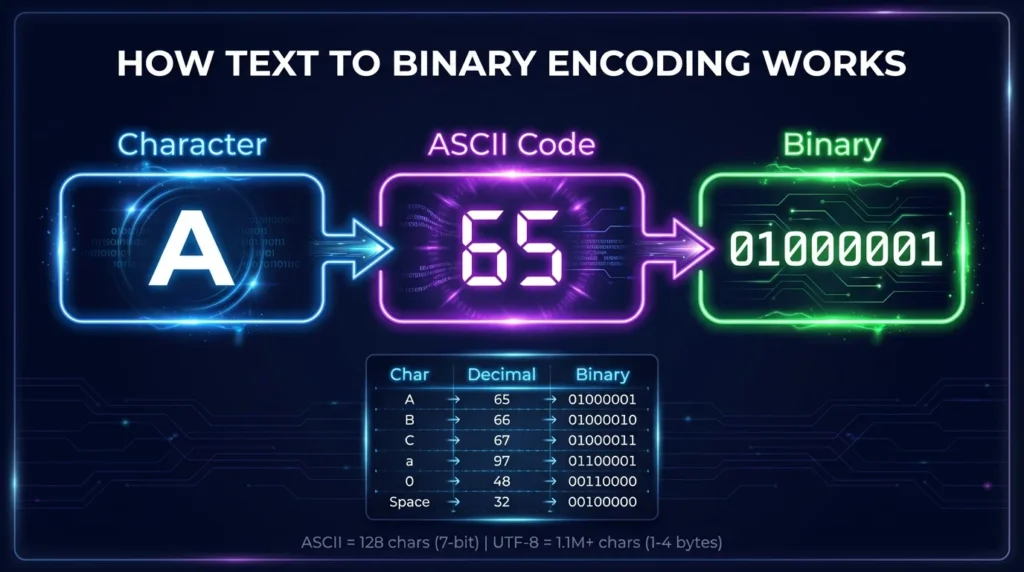
01000001
The active values are:
64
and:
1
Add them together:
64 + 1 = 65
Therefore:
01000001
has decimal value:
65
In ASCII, decimal 65 represents the letter:
A
So:
01000001 = A
This is one example of how Binary to Text conversion works.
Why Do Computers Use Binary?
Computers use binary because digital electronic components naturally support two stable states.
A transistor, which is one of the fundamental building blocks of computers, can behave similarly to an electronic switch.
It can represent:
0 = Off
and:
1 = On
Using two states makes digital processing reliable and efficient.
Binary Reduces Complexity
A system based on only two possible values is easier for electronic circuits to recognize than one requiring many different voltage levels.
This helps computers:
- process information quickly;
- store data reliably;
- reduce signal ambiguity;
- perform logical operations;
- communicate digital information.
Binary therefore forms the basic language of modern computing systems.
What Is a Bit?
A bit is the smallest basic unit of binary information.
The word bit comes from:
binary digit
A bit can have one of two values:
0
or:
1
A single bit carries very little information, so computers combine many bits together.
Examples of Bit Groups
| Bits | Possible Combinations |
| 1 bit | 2 |
| 2 bits | 4 |
| 3 bits | 8 |
| 4 bits | 16 |
| 8 bits | 256 |
The number of possible combinations grows quickly as more bits are added.
What Is a Byte?
A byte commonly contains eight bits.
For example:
01000001
contains eight binary digits, so it is one byte.
Bytes are widely used for representing and processing digital information.
Bit vs Byte
| Unit | Meaning |
| Bit | One binary digit |
| Byte | Eight bits |
| Kilobyte | A larger collection of bytes |
| Megabyte | Approximately millions of bytes |
| Gigabyte | Approximately billions of bytes |
Bytes are especially important when working with text encoding and Binary to Text conversion.
How Does Binary Represent Numbers?
Binary numbers follow powers of 2.
Consider:
00001010
The active values are:
8 + 2
Therefore:
00001010 = 10
Another Binary Number Example
Binary:
00010101
Active values:
16 + 4 + 1
Result:
21
Therefore:
00010101 = 21
The same principle applies to much larger binary numbers.
How Does Binary Represent Text?
Computers need a system that connects numeric values with readable characters.
Character encoding standards provide this connection.
ASCII is one commonly used example for explaining basic English text.
Binary to Text Example
Consider the binary value:
01001000
Its decimal value is:
72
ASCII decimal 72 represents:
H
Therefore:
01001000 = H
Another example:
01101001
equals decimal:
105
ASCII decimal 105 represents:
i
So:
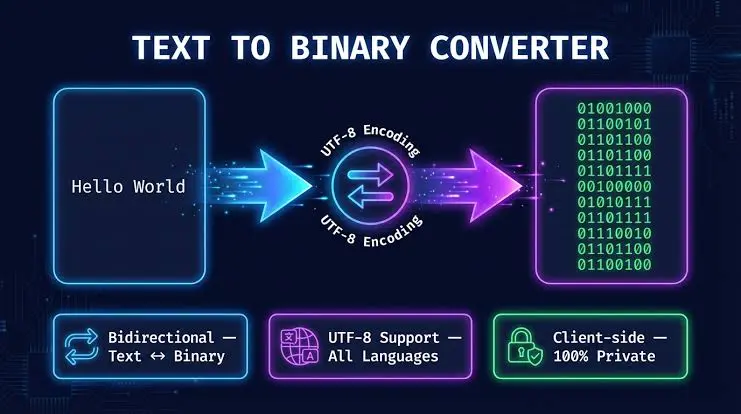
01001000 01101001
becomes:
Hi
This process is known as Binary to Text conversion.
What Is ASCII?
ASCII stands for:
American Standard Code for Information Interchange
ASCII assigns numeric values to letters, numbers, punctuation marks, spaces, and control characters.
Common ASCII Values
| Character | Decimal | Binary |
| A | 65 | 01000001 |
| B | 66 | 01000010 |
| C | 67 | 01000011 |
| a | 97 | 01100001 |
| b | 98 | 01100010 |
| 0 | 48 | 00110000 |
| 1 | 49 | 00110001 |
| Space | 32 | 00100000 |
| ! | 33 | 00100001 |
These mappings allow binary values to be converted into readable text.
Is ASCII 7-Bit or 8-Bit?
Standard ASCII uses seven bits and includes values from 0 through 127.
However, ASCII values are commonly displayed as 8-bit binary groups by adding a leading zero.
For example:
7-bit ASCII:
1000001
8-bit representation:
01000001
Both represent:
A
Displaying ASCII in eight bits makes it easier to work with byte-based systems.
How Binary Code Creates Words
A word is created by placing the binary value for each character next to the others.
Binary Code for CAT
C:
01000011
A:
01000001
T:
01010100
Complete sequence:
01000011 01000001 01010100
Binary to Text result:
CAT
Binary Code for Hello
The word Hello can be represented as:
01001000 01100101 01101100 01101100 01101111
The individual values are:
| Binary | Character |
01001000 | H |
01100101 | e |
01101100 | l |
01101100 | l |
01101111 | o |
Combined result:
Hello
How Does Binary Represent Spaces and Symbols?
Binary is not limited to alphabetic characters.
Character encoding systems can also represent:
- numbers;
- spaces;
- punctuation;
- mathematical symbols;
- special characters.
Common Binary Symbols
| Character | Binary |
| Space | 00100000 |
| ! | 00100001 |
| # | 00100011 |
| $ | 00100100 |
| % | 00100101 |
| + | 00101011 |
| . | 00101110 |
| ? | 00111111 |
| @ | 01000000 |
This enables computers to represent complete sentences rather than only letters.
Binary Number vs Binary Text
A binary number is not always the same as a binary representation of a text character.
Consider:
0101
As a binary number:
0101 = 5
However, the text character:
5
has ASCII value:
00110101
Why Is This Difference Important?
Binary:
0101
represents the numeric value 5.
Binary:
00110101
can represent the character "5" in ASCII.
Knowing how the binary data should be interpreted is essential for accurate conversion.
What Is Binary to Text?
Binary to Text is the process of interpreting binary values using a character encoding and converting them into readable characters.
The basic process is:
Binary → Numeric Value → Character → Text
Example
Binary:
01000010
Decimal:
66
ASCII:
B
Therefore:
01000010 = B
A Binary to Text converter can automate this process for longer binary strings.
How Does Binary to Text Conversion Work?
For simple ASCII text, conversion commonly involves four steps.
Step 1: Separate the Binary Values
For example:
01001000 01101001
Separate them into:
01001000
and:
01101001
Step 2: Find Their Decimal Values
01001000 = 72
01101001 = 105
Step 3: Find the Corresponding Characters
ASCII:
72 = H
105 = i
Step 4: Combine the Characters
Result:
Hi
What Happens When Binary Has No Spaces?
Binary code sometimes appears as one continuous sequence.
For example:
010000010100001001000011
If it uses 8-bit character values, it can be divided into:
01000001 01000010 01000011
These values represent:
A B C
Final result:
ABC
Why Correct Grouping Matters
Incorrectly splitting the binary sequence can change every following value.
You should therefore know the expected encoding and group size before decoding continuous binary data.
What Is UTF-8?
ASCII can represent basic English characters, but modern computing requires many more characters.
UTF-8 is a Unicode character encoding capable of representing characters from many writing systems.
ASCII and UTF-8
Standard ASCII characters use the same byte values in UTF-8.
For example:
A
ASCII:
01000001
UTF-8:
01000001
However, many characters outside ASCII require multiple UTF-8 bytes.
This means simple Binary to Text examples often use ASCII, while more complex international text may require UTF-8 decoding.
Where Is Binary Code Used?
Binary code is used throughout modern digital technology.
Computer Processing
Processors perform calculations and logical operations using binary signals.
Computer Memory
Digital information stored in memory is ultimately represented through binary states.
Data Storage
Files stored on computers are represented digitally, including:
- text;
- images;
- videos;
- music;
- software.
Communication
Networks transmit digital information that can ultimately be represented in binary form.
Programming
Although programmers usually work with higher-level languages, computers eventually execute machine-level instructions represented digitally.
How Does Binary Represent Images?
Images contain information about pixels.
Each pixel can store values describing properties such as:
- color;
- brightness;
- transparency.
These values are ultimately represented in binary.
A digital image may contain millions of pixels, so its complete binary representation can be extremely large.
How Does Binary Represent Audio?
Digital audio is created by recording sound measurements as numeric values.
Those numbers are stored digitally.
Binary can therefore represent information about:
- audio samples;
- volume levels;
- timing;
- channels;
- encoding.
The audio file you hear is processed from these digital values.
How Does Binary Represent Video?
Digital video combines:
- image frames;
- audio;
- timing information;
- metadata.
All of this information is encoded digitally and ultimately represented through binary states.
Because video contains large amounts of information, compression techniques are commonly used to reduce file size.
Binary vs Decimal
The binary and decimal systems use different bases.
Decimal System
Decimal uses:
0 1 2 3 4 5 6 7 8 9
It is:
Base 10
Binary System
Binary uses:
0 1
It is:
Base 2
Quick Comparison
| Decimal | Binary |
| 0 | 0 |
| 1 | 1 |
| 2 | 10 |
| 3 | 11 |
| 4 | 100 |
| 5 | 101 |
| 6 | 110 |
| 7 | 111 |
| 8 | 1000 |
| 9 | 1001 |
| 10 | 1010 |
Binary vs Hexadecimal
Hexadecimal is another number system frequently used in computing.
Binary is:
Base 2
Hexadecimal is:
Base 16
Hexadecimal uses:
0–9
and:
A–F
Example
Binary:
01000001
Decimal:
65
Hexadecimal:
41
ASCII:
A
Hexadecimal is often more compact than writing long binary sequences.
Why Is Binary Important?
Binary is important because it provides a simple and reliable foundation for digital computing.
It allows computers to represent:
- numbers;
- text;
- images;
- audio;
- videos;
- software instructions;
- stored files;
- network information.
Without binary representation, modern digital devices would require a completely different method for processing electronic information.
Common Misunderstandings About Binary Code
Binary can appear simple, but several common misconceptions can lead to confusion.
Every Binary Value Is Text
This is incorrect.
Binary may represent:
- numbers;
- text;
- images;
- audio;
- software;
- encrypted information;
- compressed data.
The correct interpretation depends on the format and encoding.
Binary Is Always 8 Bits Long
Binary numbers can have many different lengths.
Eight-bit groups are common because eight bits make one byte, but binary itself is not restricted to eight digits.
0110 Automatically Means the Character 6
As a binary number:
0110 = 6
But the ASCII character:
6
is:
00110110
A numeric value and a text character are different concepts.
Benefits of Understanding Binary Code
Learning binary provides a stronger understanding of how digital systems work.
It can help with:
- programming fundamentals;
- computer science;
- data encoding;
- networking;
- cybersecurity concepts;
- digital electronics;
- ASCII conversion;
- bits and bytes;
- Binary to Text conversion.
Even basic binary knowledge can make many technical concepts easier to understand.
Frequently Asked Questions
What Is Binary Code?
Binary code is a method of representing information using only two digits: 0 and 1.
Why Does Binary Use Only 0 and 1?
Digital electronic systems can reliably distinguish between two states, making binary a practical system for representing information.
What Is a Bit?
A bit is a single binary digit that can contain either 0 or 1.
What Is a Byte?
A byte commonly contains eight bits.
Example:
01000001
is one 8-bit byte.
How Does Binary Turn Into Text?
Binary values are interpreted as numbers and matched with characters through an encoding system such as ASCII.
What Is 01000001 in Binary to Text?
01000001 equals decimal 65.
In ASCII:
65 = A
Therefore:
01000001 = A
What Is Hello in Binary?
Hello in 8-bit ASCII representation is:
01001000 01100101 01101100 01101100 01101111
Can Binary Represent Numbers?
Yes. Binary is a number system and can directly represent numeric values.
Can Binary Represent Images?
Yes. Image information such as pixel values is stored digitally and ultimately represented through binary states.
Can Binary Represent Sound?
Yes. Digital audio stores sound measurements as numeric information that can ultimately be represented in binary.
Is Binary the Same as ASCII?
No.
Binary is a number system using 0 and 1.
ASCII is a character encoding system that assigns numeric values to characters. Those numeric values can be represented in binary.
What Is the Difference Between Binary and Binary to Text?
Binary refers to the base-2 system used to represent digital values.
Binary to Text refers to interpreting binary values through a character encoding to produce readable text.
Final Thoughts
Binary to Text demonstrates one of the most useful applications of binary code by showing how combinations of 0 and 1 can become readable letters, numbers, symbols, and complete messages. Binary itself is the foundation of digital computing and allows computers to represent many different types of information.