Binary to Text becomes easier when you have an alphabet chart showing how each letter is represented in binary. Using ASCII values, every uppercase and lowercase English letter can be matched with a binary pattern, making manual decoding faster and easier to understand.
This article provides a complete A to Z binary letter chart, explains uppercase and lowercase differences, shows how ASCII values connect with binary, and includes examples so you can read, verify, and convert binary letters without confusion.
What Is a Binary Alphabet?
A binary alphabet is a reference showing how letters can be represented using combinations of 0 and 1.
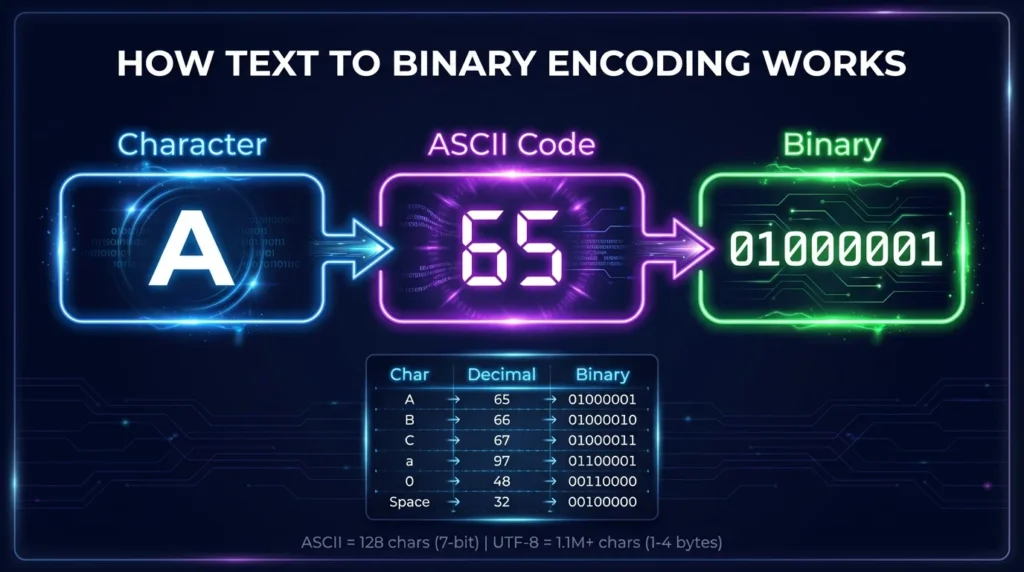
Computers do not directly store the visual shape of letters such as A, B, or C. Character encoding systems assign each character a numeric value, and that number can then be represented in binary.
For example:
A= decimal 65 =01000001B= decimal 66 =01000010C= decimal 67 =01000011
These mappings allow binary data to represent readable text.
How Does Binary to Text Work With Letters?
For basic English letters, Binary to Text conversion can be understood through ASCII.
The process is:
Binary → Decimal value → ASCII character
For example:
01000001
has the decimal value:
65
ASCII value 65 represents:
A
Therefore:
01000001 = A
You can perform the same process for every uppercase and lowercase letter.
Complete Binary Alphabet A to Z Chart
Uppercase and lowercase letters have different ASCII values, which means they also have different binary codes.
Uppercase Binary Letters A to Z
| Letter | Decimal | 8-Bit Binary | Hex |
|---|---|---|---|
| A | 65 | 01000001 | 41 |
| B | 66 | 01000010 | 42 |
| C | 67 | 01000011 | 43 |
| D | 68 | 01000100 | 44 |
| E | 69 | 01000101 | 45 |
| F | 70 | 01000110 | 46 |
| G | 71 | 01000111 | 47 |
| H | 72 | 01001000 | 48 |
| I | 73 | 01001001 | 49 |
| J | 74 | 01001010 | 4A |
| K | 75 | 01001011 | 4B |
| L | 76 | 01001100 | 4C |
| M | 77 | 01001101 | 4D |
| N | 78 | 01001110 | 4E |
| O | 79 | 01001111 | 4F |
| P | 80 | 01010000 | 50 |
| Q | 81 | 01010001 | 51 |
| R | 82 | 01010010 | 52 |
| S | 83 | 01010011 | 53 |
| T | 84 | 01010100 | 54 |
| U | 85 | 01010101 | 55 |
| V | 86 | 01010110 | 56 |
| W | 87 | 01010111 | 57 |
| X | 88 | 01011000 | 58 |
| Y | 89 | 01011001 | 59 |
| Z | 90 | 01011010 | 5A |
Lowercase Binary Letters a to z
| Letter | Decimal | 8-Bit Binary | Hex |
| a | 97 | 01100001 | 61 |
| b | 98 | 01100010 | 62 |
| c | 99 | 01100011 | 63 |
| d | 100 | 01100100 | 64 |
| e | 101 | 01100101 | 65 |
| f | 102 | 01100110 | 66 |
| g | 103 | 01100111 | 67 |
| h | 104 | 01101000 | 68 |
| i | 105 | 01101001 | 69 |
| j | 106 | 01101010 | 6A |
| k | 107 | 01101011 | 6B |
| l | 108 | 01101100 | 6C |
| m | 109 | 01101101 | 6D |
| n | 110 | 01101110 | 6E |
| o | 111 | 01101111 | 6F |
| p | 112 | 01110000 | 70 |
| q | 113 | 01110001 | 71 |
| r | 114 | 01110010 | 72 |
| s | 115 | 01110011 | 73 |
| t | 116 | 01110100 | 74 |
| u | 117 | 01110101 | 75 |
| v | 118 | 01110110 | 76 |
| w | 119 | 01110111 | 77 |
| x | 120 | 01111000 | 78 |
| y | 121 | 01111001 | 79 |
| z | 122 | 01111010 | 7A |
Why Do Uppercase and Lowercase Letters Have Different Binary Codes?
Uppercase and lowercase letters are treated as separate characters in ASCII.
For example:
Uppercase A:
01000001
Decimal:
65
Lowercase a:
01100001
Decimal:
97
They look related to humans, but a computer must be able to distinguish between them.
Uppercase vs Lowercase Example
| Character | Decimal | Binary |
| A | 65 | 01000001 |
| a | 97 | 01100001 |
| B | 66 | 01000010 |
| b | 98 | 01100010 |
| Z | 90 | 01011010 |
| z | 122 | 01111010 |
In ASCII, the decimal difference between matching uppercase and lowercase English letters is 32.
For example:
97 - 65 = 32
That is why related uppercase and lowercase binary patterns also differ consistently.
How to Convert Binary Letters to Text
You can manually decode binary letters with a simple process.
Step 1: Separate the Binary Into Character Groups
Consider:
01000011 01000001 01010100
There are three 8-bit groups:
01000011
01000001
01010100
Step 2: Find Each Binary Value
Using the alphabet chart:
01000011 = C
01000001 = A
01010100 = T
Step 3: Join the Letters
Combine the characters:
CAT
Therefore:
01000011 01000001 01010100 = CAT
Binary to Text Example for HELLO
Consider:
01001000 01000101 01001100 01001100 01001111
Using the uppercase alphabet chart:
| Binary | Letter |
01001000 | H |
01000101 | E |
01001100 | L |
01001100 | L |
01001111 | O |
Result:
HELLO
Binary to Text Example for hello
Lowercase letters use different values.
Binary:
01101000 01100101 01101100 01101100 01101111
Conversion:
| Binary | Letter |
01101000 | h |
01100101 | e |
01101100 | l |
01101100 | l |
01101111 | o |
Result:
hello
This example shows why letter case matters during binary conversion.
How Are Binary Letter Values Calculated?
Every position in an 8-bit binary value represents a power of two.
The place values are:
| Position | Value |
| 1 | 128 |
| 2 | 64 |
| 3 | 32 |
| 4 | 16 |
| 5 | 8 |
| 6 | 4 |
| 7 | 2 |
| 8 | 1 |
Example: Calculate Binary A
Uppercase A is:
01000001
The active values are:
64 + 1
Result:
65
ASCII decimal 65 is:
A
Example: Calculate Binary Z
Uppercase Z is:
01011010
The active values are:
64 + 16 + 8 + 2
Result:
90
ASCII decimal 90 is:
Z
Why Are Binary Letters Usually Shown With 8 Bits?
Standard ASCII is a 7-bit character set, with values from 0 through 127.
However, binary letter charts commonly display ASCII values using eight digits by adding a leading zero.
For example:
7-bit A:
1000001
8-bit display:
01000001
Both represent decimal 65 and therefore the character A.
Using eight digits makes character boundaries clearer because eight bits form one byte.
What Is ASCII and Why Does It Matter?
ASCII stands for American Standard Code for Information Interchange.
It assigns numerical values to basic characters, including:
- uppercase English letters;
- lowercase English letters;
- digits;
- punctuation;
- spaces;
- control characters.
For example:
A= 65Z= 90a= 97z= 122
Those decimal values can be represented in binary, which creates the familiar binary alphabet chart.
Binary Letters vs Binary Numbers
A binary value representing a number is not automatically the same as a text character.
For example:
1001
as a binary number equals:
9
However, the ASCII text character 9 is:
00111001
This distinction matters because binary data must be interpreted according to its intended format.
Numeric Value vs Character
| Meaning | Binary | Result |
| Binary number | 1001 | Decimal 9 |
| ASCII character | 00111001 | Text “9” |
The same principle applies when decoding letters.
What About Spaces Between Binary Letters?
A space between words also has its own ASCII value.
The ASCII space character is:
00100000
For example, the phrase:
HI CAT
requires a space between the two words.
Binary:
01001000 01001001 00100000 01000011 01000001 01010100
The group:
00100000
creates the space.
Without it, the output would become:
HICAT
Can Binary Letters Be Written Without Spaces?
Yes. Binary data may appear as one continuous sequence.
For example:
010000010100001001000011
If you know that each character uses an 8-bit byte, divide the sequence every eight digits:
01000001 01000010 01000011
The values are:
A B C
Result:
ABC
Correct grouping is important. If one bit is missing or added, later characters may be decoded incorrectly.
ASCII Binary Alphabet vs UTF-8
ASCII is useful for explaining basic English letters, but modern text often uses UTF-8.
UTF-8 is a Unicode encoding that can represent characters from many languages.
ASCII Letters in UTF-8
The basic ASCII range keeps the same byte values in UTF-8.
For example:
A = 01000001
and:
a = 01100001
remain the same.
Characters Outside the ASCII Alphabet
Characters outside standard ASCII may require more than one UTF-8 byte.
For this reason, an A-to-Z binary chart is suitable for standard English letters but is not a complete chart for every character used in world languages.
Common Mistakes When Reading Binary Letters
Several small errors can change the decoded output.
Confusing Uppercase and Lowercase
01000001 means:
A
while:
01100001 means:
a
Letter case must be preserved.
Using the Wrong Group Size
For an 8-bit ASCII representation, each displayed letter should be read in groups of eight bits.
Incorrect grouping may produce different values.
Removing Leading Zeros
A leading zero helps preserve the full byte format.
For example:
01000001
is easier to recognize as an 8-bit representation than:
1000001
even though both have the same ASCII numeric value.
Assuming Every Binary Sequence Contains Letters
Binary can represent many types of data, including numbers, images, audio, files, and program instructions.
A binary alphabet chart is useful only when the values are intended to represent compatible text characters.
Quick Binary Alphabet Reference
Here are some commonly searched letter values:
| Letter | Binary |
| A | 01000001 |
| B | 01000010 |
| C | 01000011 |
| H | 01001000 |
| M | 01001101 |
| S | 01010011 |
| X | 01011000 |
| Y | 01011001 |
| Z | 01011010 |
| a | 01100001 |
| e | 01100101 |
| h | 01101000 |
| m | 01101101 |
| s | 01110011 |
| z | 01111010 |
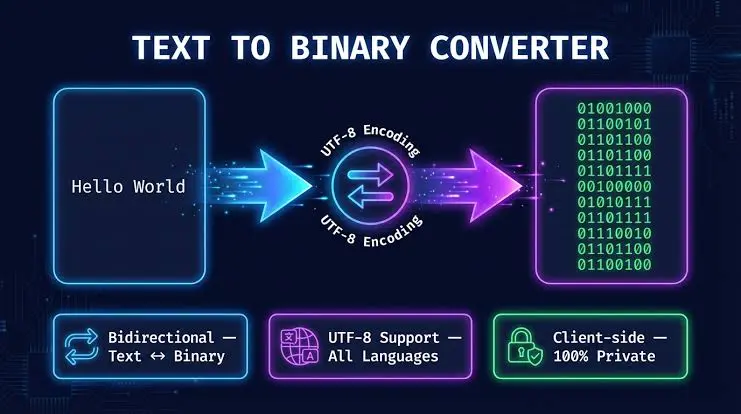
For individual values, this chart provides a quick reference. For longer messages, a Binary to Text converter can process multiple bytes automatically.
Frequently Asked Questions
What Is the Binary Code for A?
Uppercase A is decimal 65 in ASCII. Its commonly displayed 8-bit binary form is:
01000001
What Is the Binary Code for Z?
Uppercase Z has ASCII decimal value 90 and binary value:
01011010
What Is Lowercase a in Binary?
Lowercase a has ASCII decimal value 97.
Its 8-bit binary representation is:
01100001
Are Uppercase and Lowercase Binary Letters the Same?
No. Uppercase and lowercase characters have different ASCII values and therefore different binary representations.
For example:
A = 01000001
a = 01100001
How Do I Convert Binary Letters to Text?
Separate the binary into the correct character groups and match each group with its ASCII character. An 8-bit ASCII chart or Binary to Text converter can make this process faster.
Is Every Binary Letter 8 Bits Long?
Standard ASCII itself uses seven bits, but ASCII characters are commonly displayed in 8-bit byte form by adding a leading zero. Other text encodings may use different byte structures.
What Is a Space in Binary?
The ASCII space character has decimal value 32.
Its 8-bit binary representation is:
00100000
Can the Binary Alphabet Represent Every Language?
No. Standard ASCII mainly covers basic English letters and symbols. Unicode encodings such as UTF-8 are needed for the much larger range of characters used across world languages.
Final Thoughts
A complete binary alphabet chart provides a simple way to see how uppercase and lowercase A-to-Z letters are represented as binary values. Understanding ASCII, byte grouping, and letter case makes manual decoding much easier and helps prevent common conversion errors.
Binary to Text conversion becomes especially straightforward when you can match each byte with the correct character. Use the A-to-Z tables above for quick reference, or use a converter when you need to decode longer binary words and messages.