Binary to Text conversion can be done manually when you understand how binary values map to characters through an encoding such as ASCII. Instead of relying on a converter, you can split a binary message into groups, calculate each value, and match it with the correct letter, number, space, or symbol.
This guide shows how to decode binary code by hand, use eight-bit place values, identify ASCII characters, handle continuous strings, verify results, and avoid common mistakes during manual conversion.
What Does It Mean to Decode Binary Code Manually?
Manual binary decoding means interpreting a binary sequence without depending on an automatic converter.
For simple ASCII text, the basic process is:
Binary → Decimal → ASCII Character
For example:
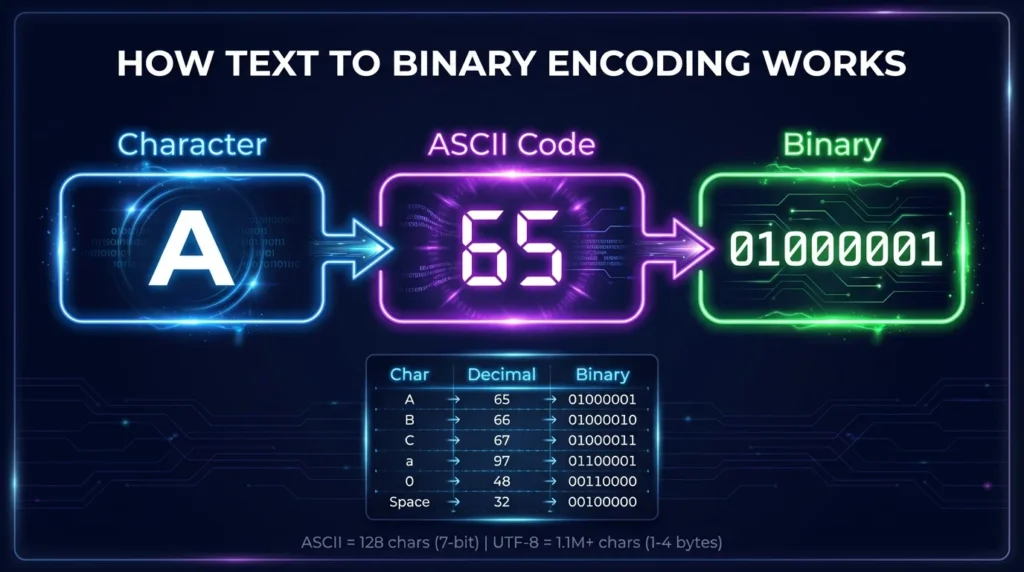
01000001
can be converted into decimal:
65
ASCII decimal 65 represents:
A
Therefore:
01000001 = A
When several binary groups appear together, you repeat this process for each value and combine the resulting characters.
What Do You Need to Decode Binary by Hand?
You only need to understand three basic concepts:
- binary place values;
- byte grouping;
- character encoding such as ASCII.
Binary Digits
Binary uses only two digits:
0
and:
1
Each binary digit is called a bit.
Bytes
Eight bits form one byte.
Example:
01000001
contains eight bits.
Byte grouping is particularly useful when decoding ASCII-compatible text.
ASCII
ASCII assigns numeric values to basic English letters, numbers, spaces, punctuation, and control characters.
For example:
65 = A
66 = B
97 = a
32 = Space
Once you calculate the decimal value of a binary byte, an ASCII chart can tell you which character it represents.
How to Decode Binary Code Manually
The easiest manual method uses four steps.
Step 1: Split the Binary Into Groups
Start by identifying the byte boundaries.
Suppose you have:
01001000 01101001
The two groups are:
01001000
01101001
Each group contains eight bits.
If the input appears without spaces:
0100100001101001
split it every eight digits:
01001000 01101001
This grouping assumes you already know the data is byte-oriented text.
Step 2: Write the Binary Place Values
For an eight-bit value, use:
| Binary Position | Decimal Value |
|---|---|
10000000 | 128 |
01000000 | 64 |
00100000 | 32 |
00010000 | 16 |
00001000 | 8 |
00000100 | 4 |
00000010 | 2 |
00000001 | 1 |
Read these values from left to right:
128, 64, 32, 16, 8, 4, 2, 1
Step 3: Add the Values Where the Bit Is 1
Take:
01001000
Match the bits with their place values:
| Bit | Place Value | Include? |
| 0 | 128 | No |
| 1 | 64 | Yes |
| 0 | 32 | No |
| 0 | 16 | No |
| 1 | 8 | Yes |
| 0 | 4 | No |
| 0 | 2 | No |
| 0 | 1 | No |
Add the active values:
64 + 8 = 72
Therefore:
01001000 = 72
Step 4: Match the Decimal Value With ASCII
ASCII decimal 72 represents:
H
Now decode the second byte:
01101001
Its active values are:
64 + 32 + 8 + 1
Result:
105
ASCII decimal 105 represents:
i
Combine the characters:
Hi
So:
01001000 01101001 = Hi
Manual Binary to Text Example: CAT
Consider:
01000011 01000001 01010100
Decode one byte at a time.
Decode 01000011
Active values:
64 + 2 + 1
Decimal:
67
ASCII:
C
Decode 01000001
Active values:
64 + 1
Decimal:
65
ASCII:
A
Decode 01010100
Active values:
64 + 16 + 4
Decimal:
84
ASCII:
T
Final result:
CAT
Manual Binary to Text Example: HELLO
Now decode:
01001000 01000101 01001100 01001100 01001111
| Binary | Decimal | Character |
01001000 | 72 | H |
01000101 | 69 | E |
01001100 | 76 | L |
01001100 | 76 | L |
01001111 | 79 | O |
Result:
HELLO
Once you recognize common binary letter patterns, manual decoding becomes much faster.
How to Calculate Binary Values Without a Calculator
Binary place values are powers of two.
For an eight-bit byte:
128 64 32 16 8 4 2 1
You only add the values corresponding to 1 bits.
Example: 01010011
Binary:
01010011
Active values:
64 + 16 + 2 + 1
Total:
83
ASCII decimal 83 represents:
S
Therefore:
01010011 = S
Example: 01100001
Binary:
01100001
Active values:
64 + 32 + 1
Total:
97
ASCII decimal 97 represents:
a
Therefore:
01100001 = a
How to Read Binary Letters Faster
You do not always need to calculate every binary value from scratch.
A binary alphabet or ASCII chart lets you match commonly used values directly.
Common Uppercase Letters
| Letter | Binary |
| A | 01000001 |
| B | 01000010 |
| C | 01000011 |
| D | 01000100 |
| H | 01001000 |
| M | 01001101 |
| S | 01010011 |
| Z | 01011010 |
Common Lowercase Letters
| Letter | Binary |
| a | 01100001 |
| b | 01100010 |
| c | 01100011 |
| e | 01100101 |
| h | 01101000 |
| i | 01101001 |
| s | 01110011 |
| z | 01111010 |
A chart is especially useful when manually decoding longer words.
How to Decode Numbers Stored as Text
Numbers displayed as text have their own ASCII codes.
For example:
Character:
5
has decimal value:
53
Its binary representation is:
00110101
Therefore:
00110101 = "5"
Numeric Binary vs Character Binary
Do not confuse:
0101
with:
00110101
0101 is the binary number for decimal 5.
00110101 is the ASCII representation of the character "5".
| Binary | Meaning | Result |
0101 | Binary number | 5 |
00110101 | ASCII character | “5” |
Knowing what the binary data represents is essential before decoding it.
How to Decode Spaces and Symbols
A binary message may contain spaces and punctuation in addition to letters.
Common ASCII Values
| Character | Decimal | Binary |
| Space | 32 | 00100000 |
| ! | 33 | 00100001 |
| # | 35 | 00100011 |
| + | 43 | 00101011 |
| – | 45 | 00101101 |
| . | 46 | 00101110 |
| ? | 63 | 00111111 |
| @ | 64 | 01000000 |
Example: Decode Hi!
Binary:
01001000 01101001 00100001
Decode each byte:
01001000 = H
01101001 = i
00100001 = !
Result:
Hi!
How to Decode a Space Between Words
Spaces must also be decoded.
Consider:
01001000 01001001 00100000 01000001
The bytes represent:
H
I
Space
A
Result:
HI A
The binary value:
00100000
represents the standard ASCII space.
Ignoring this byte would produce:
HIA
instead.
How to Decode Binary Without Spaces
Continuous binary strings may initially look difficult.
Example:
010000010100001001000011
If the source uses eight-bit text bytes, divide it into:
01000001 01000010 01000011
Then decode:
01000001 = A
01000010 = B
01000011 = C
Result:
ABC
Count the Total Number of Bits
For a sequence expected to contain complete eight-bit bytes, the total bit count should normally be divisible by eight.
For example:
24 bits ÷ 8 = 3 bytes
If the length does not divide cleanly by eight, investigate before changing the data.
Possible causes include:
- missing digits;
- extra digits;
- a different encoding;
- separators removed incorrectly;
- non-text binary data.
Why Leading Zeros Matter
Consider:
1000001
Its numeric value is:
65
You may also see it written as:
01000001
Both have the same numeric value.
However, the second form clearly displays a complete eight-bit byte.
When manually decoding a message, consistent byte lengths make boundaries easier to identify and reduce errors.
Is ASCII 7-Bit or 8-Bit?
Standard ASCII is a 7-bit character encoding.
Its defined values range from:
0
through:
127
ASCII characters are often displayed inside eight-bit bytes by adding a leading zero.
For example:
7-bit:
1000001
8-bit display:
01000001
Both represent:
A
This explains why manual Binary to Text examples often use groups of eight bits even though standard ASCII itself is a 7-bit code.
Can Every Binary Byte Be Decoded as ASCII Text?
No.
An eight-bit byte can represent decimal values from 0 through 255, while standard ASCII only covers 0 through 127.
ASCII also contains control characters that are not printable.
If a binary sequence produces unusual output, it may:
- contain control codes;
- use UTF-8;
- use another character encoding;
- contain corrupted data;
- represent something other than text.
Do not assume every group of eight bits should produce a visible English character.
ASCII vs UTF-8 When Decoding Manually
ASCII is convenient for manual decoding because each standard ASCII character can be represented with a simple numeric value.
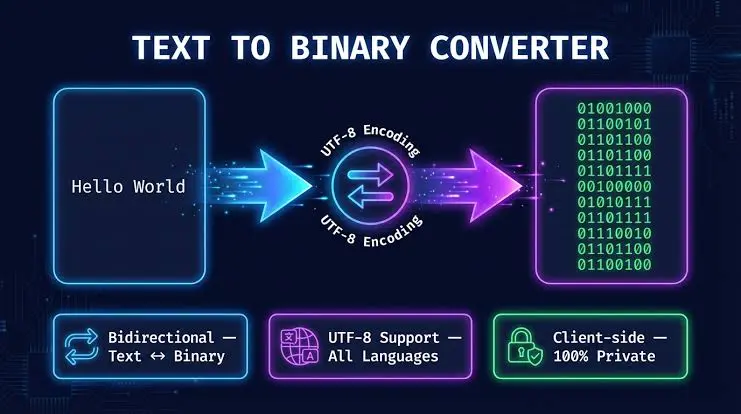
UTF-8 is more flexible.
It supports Unicode characters from many writing systems.
ASCII Range in UTF-8
Standard ASCII characters retain the same byte values in UTF-8.
For example:
01000001 = A
Non-ASCII UTF-8 Characters
Characters outside the ASCII range can require multiple bytes.
That makes manual decoding more complex because several consecutive bytes may combine to represent one character.
For basic English binary messages, ASCII-style byte decoding is usually easier to demonstrate manually.
How to Tell Whether Binary Represents Text
Binary itself does not identify its meaning.
The same binary digits may represent different forms of data depending on context.
Binary can represent:
- text;
- numbers;
- images;
- audio;
- video;
- program instructions;
- compressed files;
- encrypted data.
Signs You May Be Looking at Text
Text-oriented binary often has:
- consistent byte boundaries;
- byte values corresponding to printable characters;
- recognizable spaces such as
00100000; - repeated patterns matching common letters.
These clues are useful, but they do not guarantee a particular encoding.
Knowing the source or expected encoding is more reliable.
Common Mistakes When Decoding Binary Manually
Manual conversion is straightforward, but small mistakes can change the result.
Using the Wrong Place Values
For eight bits, remember:
128 64 32 16 8 4 2 1
A misplaced value creates an incorrect decimal result.
Adding Values for Zero Bits
Only positions containing 1 contribute to the total.
For:
01000001
calculate:
64 + 1
not all eight place values.
Splitting the Binary Incorrectly
If byte boundaries shift by even one bit, every later character may decode incorrectly.
Confusing Numbers With Number Characters
Binary decimal 7 and ASCII character "7" are different values.
Forgetting Spaces
00100000
is meaningful when decoding ASCII text because it represents a space.
Assuming the Encoding Is ASCII
The source may use another encoding, particularly for non-English characters.
How to Verify Manual Binary Decoding
Manual calculations should be checked systematically.
Check the Number of Bits
Confirm that each intended byte has eight digits.
Recalculate the Decimal Value
Add the active binary place values again.
Check the ASCII Mapping
Make sure the decimal value corresponds to the character you selected.
Preserve Character Case
Uppercase and lowercase letters have different ASCII values.
For example:
01000001 = A
01100001 = a
Check Spaces and Punctuation
A readable message may depend on correctly decoding non-letter characters.
Manual Binary Decoding vs a Binary Converter
Manual and automatic conversion serve different needs.
Decode Manually When You Want To
- understand binary place values;
- practice binary mathematics;
- study ASCII;
- verify a small number of bytes;
- understand how character encoding works.
Use a Converter When You Need To
- decode long messages;
- process many bytes quickly;
- reduce arithmetic errors;
- handle continuous binary strings;
- test conversion results.
Learning the manual method makes it easier to understand what a Binary to Text converter is doing behind the scenes.
A Faster Manual Decoding Technique
Once you understand binary place values, use a three-stage workflow:
Group → Calculate → Match
Group
Separate the data into valid byte groups.
Calculate
Convert each binary value into decimal.
Match
Look up the decimal value in an ASCII chart.
For example:
01000100
↓
68
↓
D
Then repeat for the remaining bytes.
This method avoids unnecessary steps while keeping the process easy to verify.
Frequently Asked Questions
How Do I Decode Binary Code Manually?
Split the binary into appropriate groups, calculate the decimal value of each group using binary place values, match the result with the correct character encoding, and combine the characters.
What Is the Easiest Way to Convert Binary to Text by Hand?
For simple ASCII text, use eight-bit groups and an ASCII reference table. Convert each byte to decimal, identify the corresponding character, and join the results.
What Does 01000001 Mean?
01000001 equals decimal 65.
In ASCII, decimal 65 represents:
A
What Does 00100000 Mean in Binary Text?
00100000 equals decimal 32 and represents an ASCII space.
Can I Decode Binary Without an ASCII Chart?
Yes, if you already know the relevant character values. However, an ASCII chart makes manual decoding quicker and reduces the need to memorize codes.
How Do I Decode Binary That Has No Spaces?
If you know the data contains eight-bit bytes, split the sequence every eight digits before decoding each group. Do not assume eight-bit grouping if the source format is unknown.
Why Does My Manual Binary Conversion Produce Strange Characters?
Possible causes include incorrect byte grouping, calculation errors, control characters, missing bits, the wrong character encoding, or binary data that does not represent text.
Is Manual Binary Decoding Better Than Using a Converter?
Neither method is always better. Manual decoding is useful for learning and checking small examples, while a converter is more efficient for long or complex binary sequences.
Final Thoughts
Binary to Text can be decoded manually by separating binary into suitable groups, calculating each value with binary place values, and matching those numbers to characters through the correct encoding. For basic ASCII examples, the method is simple enough to perform by hand once you understand byte boundaries and place values.