Binary to Text conversion depends on the character encoding used to interpret binary bytes. ASCII works well for English letters, numbers, spaces, and symbols, while UTF-8 supports the larger Unicode character set used across modern websites, applications, and digital communication.
Understanding the difference prevents incorrect decoding when binary data contains accented letters, non-English scripts, or special characters. This guide explains ASCII and UTF-8, compares their byte structures, shows examples, and helps you choose the encoding for accurate binary text conversion.
What Is Character Encoding?
Character encoding is a system that connects numeric values with readable characters.
Computers ultimately process digital data as binary values, but humans work with characters such as:
- A
- B
- 5
- ?
- é
- €
- 你
An encoding defines how these characters are represented as bytes.
ASCII and UTF-8 are two important examples, although they differ greatly in how many characters they can represent.
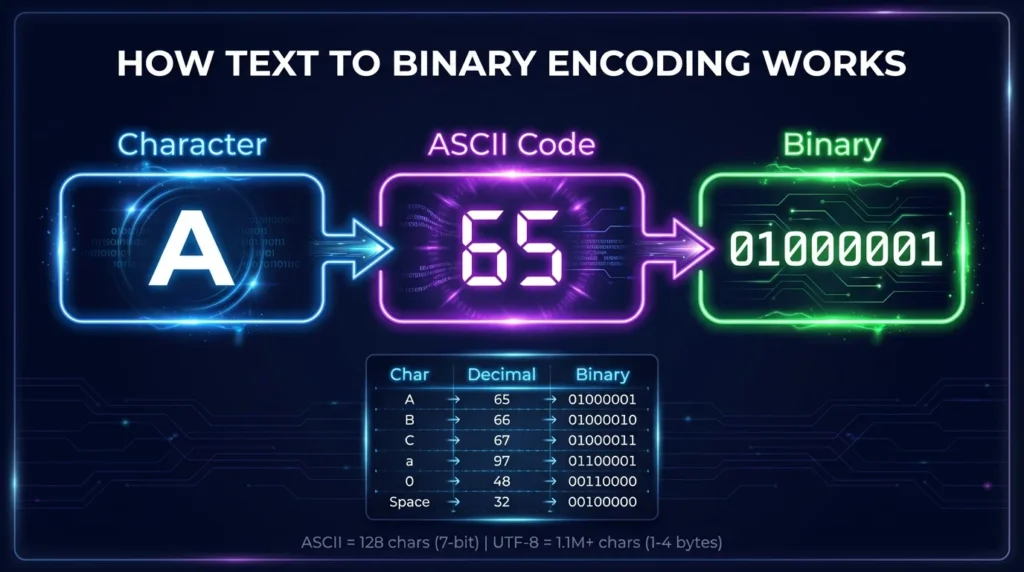
Simple Encoding Example
Uppercase A has ASCII decimal value:
65
Its binary representation is:
01000001
So:
01000001 → 65 → A
UTF-8 uses the same byte for this ASCII-range character.
This shared range is one of the most important relationships between ASCII and UTF-8.
What Is ASCII?
ASCII stands for American Standard Code for Information Interchange.
Standard ASCII is a 7-bit character encoding with values from:
0 to 127
This gives 128 possible values.
ASCII includes:
- uppercase English letters;
- lowercase English letters;
- digits 0–9;
- spaces;
- punctuation;
- common symbols;
- control characters.
Common ASCII Binary Values
| Character | Decimal | Binary |
|---|---|---|
| A | 65 | 01000001 |
| B | 66 | 01000010 |
| Z | 90 | 01011010 |
| a | 97 | 01100001 |
| z | 122 | 01111010 |
| 0 | 48 | 00110000 |
| 5 | 53 | 00110101 |
| Space | 32 | 00100000 |
| ! | 33 | 00100001 |
| ? | 63 | 00111111 |
Although ASCII itself uses seven bits, its values are commonly displayed inside 8-bit bytes with a leading zero.
For example:
7-bit:
1000001
8-bit display:
01000001
Both represent A.
What Is UTF-8?
UTF-8 is a character encoding for Unicode.
Unicode defines characters from a far larger range of writing systems and symbol sets than ASCII.
UTF-8 encodes Unicode characters using between one and four bytes.
UTF-8 Byte Lengths
A UTF-8 character can use:
- 1 byte;
- 2 bytes;
- 3 bytes;
- 4 bytes.
The required number depends on the Unicode code point being encoded.
Basic ASCII characters use one byte.
Many accented letters use two bytes.
Numerous writing systems and symbols use three bytes.
Characters outside the Basic Multilingual Plane, including many emoji, require four bytes.
ASCII vs UTF-8: Key Differences
The most important differences are character coverage and byte length.
| Feature | ASCII | UTF-8 |
| Character system | ASCII | Unicode |
| Standard range | 0–127 | Unicode code points encoded in UTF-8 |
| Bytes per character | Effectively one byte when stored in bytes | 1–4 bytes |
| English letters | Yes | Yes |
| Numbers | Yes | Yes |
| Common punctuation | Yes | Yes |
| Accented characters | Not in standard ASCII | Yes |
| Many world scripts | No | Yes |
| Emoji | No | Yes |
| ASCII compatibility | Original character set | First 128 characters use identical byte values |
UTF-8 can therefore represent everything ASCII can represent while also supporting many additional characters.
How ASCII and UTF-8 Work Together
UTF-8 was designed so that the ASCII range remains compatible.
Unicode code points from:
U+0000
through:
U+007F
use the same single-byte values as ASCII.
Example: Letter A
ASCII:
01000001
UTF-8:
01000001
Result:
A
Example: Lowercase a
ASCII:
01100001
UTF-8:
01100001
Result:
a
Example: Number 5
ASCII:
00110101
UTF-8:
00110101
Result:
5
This compatibility means plain ASCII text is also valid UTF-8.
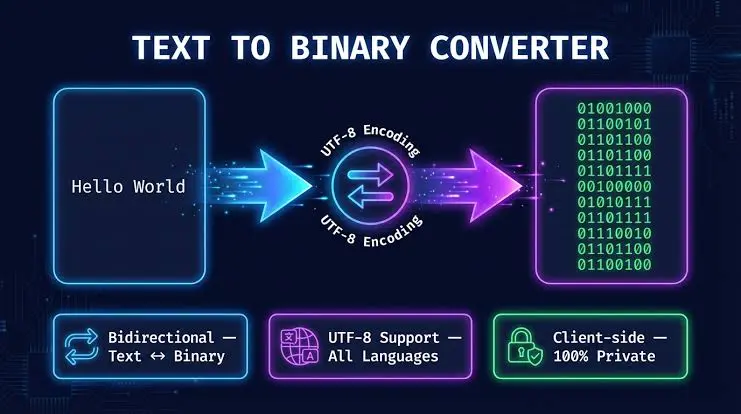
How Binary to Text Works With ASCII
For ASCII input, manual decoding is straightforward.
Consider:
01001000 01101001
Step 1: Read the First Byte
01001000
Decimal:
72
ASCII:
H
Step 2: Read the Second Byte
01101001
Decimal:
105
ASCII:
i
Step 3: Combine the Characters
Result:
Hi
For ASCII-range text, this same byte sequence also decodes correctly as UTF-8.
How Binary to Text Works With UTF-8
UTF-8 becomes more important when a character is outside ASCII.
One character may require multiple bytes, so decoding each byte as an independent ASCII character would be incorrect.
Example: é in UTF-8
The character:
é
has Unicode code point:
U+00E9
Its UTF-8 bytes are:
C3 A9
In binary:
11000011 10101001
These two bytes together represent one character:
é
If each byte were incorrectly treated as a separate ASCII character, the result would not be the intended text.
Why One UTF-8 Character Can Use Multiple Bytes
UTF-8 uses recognizable bit patterns to indicate how many bytes belong to a character.
Broadly:
- a leading byte indicates the sequence length;
- continuation bytes supply additional data;
- all bytes must be interpreted together.
For ASCII-range characters, the first bit is 0, so one byte is enough.
Characters outside that range use multi-byte sequences.
UTF-8 Pattern Overview
| Character Size | General Byte Pattern |
| 1 byte | 0xxxxxxx |
| 2 bytes | 110xxxxx 10xxxxxx |
| 3 bytes | 1110xxxx 10xxxxxx 10xxxxxx |
| 4 bytes | 11110xxx 10xxxxxx 10xxxxxx 10xxxxxx |
The x positions carry encoded information from the Unicode code point.
Binary to Text Example With an Accented Letter
Consider the UTF-8 binary:
11000011 10101001
This corresponds to hexadecimal:
C3 A9
Together these bytes represent:
é
Why ASCII Cannot Decode It Directly
Standard ASCII only covers values through 127.
Both UTF-8 bytes here have values above the ASCII range.
Therefore, treating them as standard ASCII does not produce the correct character.
The encoding must be interpreted as UTF-8.
Binary to Text Example With the Euro Symbol
The euro symbol:
€
has Unicode code point:
U+20AC
Its UTF-8 byte sequence is:
E2 82 AC
Binary:
11100010 10000010 10101100
All three bytes together represent one character:
€
This is a clear example of why an 8-bit binary group does not always equal one visible character.
Binary to Text Example With a Chinese Character
The character:
你
has Unicode code point:
U+4F60
Its UTF-8 representation is:
E4 BD A0
Binary:
11100100 10111101 10100000
These three bytes combine to represent:
你
Standard ASCII has no equivalent character because its character set is limited to the original ASCII range.
Binary to Text Example With an Emoji
The emoji:
🙂
has Unicode code point:
U+1F642
Its UTF-8 representation uses four bytes:
F0 9F 99 82
Binary:
11110000 10011111 10011001 10000010
Those four bytes together represent one visible character.
This example demonstrates why assuming one byte equals one character can fail with UTF-8.
ASCII vs UTF-8 Examples at a Glance
| Character | ASCII | UTF-8 Hex | UTF-8 Binary |
| A | Supported | 41 | 01000001 |
| 5 | Supported | 35 | 00110101 |
| ! | Supported | 21 | 00100001 |
| é | Not standard ASCII | C3 A9 | 11000011 10101001 |
| € | Not standard ASCII | E2 82 AC | 11100010 10000010 10101100 |
| 你 | Not standard ASCII | E4 BD A0 | 11100100 10111101 10100000 |
| 🙂 | Not standard ASCII | F0 9F 99 82 | 11110000 10011111 10011001 10000010 |
This table highlights the main practical difference: ASCII characters require simple single-byte values, while UTF-8 can use multiple bytes for broader Unicode characters.
Does 8-Bit Binary Always Mean ASCII?
No.
An 8-bit group is simply one byte.
For example:
11000011
is a valid byte value.
It does not automatically represent a standard ASCII character.
Its meaning depends on context and encoding.
In UTF-8:
11000011
can act as the leading byte of a two-byte sequence.
For example:
11000011 10101001
represents:
é
So byte boundaries and character boundaries are not always identical.
Why Encoding Matters in Binary to Text Conversion
Binary data contains values, but those values need rules for interpretation.
Without knowing the encoding, the same bytes may be interpreted differently.
Suppose you encounter:
11000011 10101001
If you know the encoding is UTF-8, the result is:
é
Without that information, simply treating each byte as an independent character can create incorrect output.
Encoding provides the rules that connect raw bytes with intended characters.
What Happens When You Use the Wrong Encoding?
Using the wrong encoding often creates garbled text.
This problem is sometimes called mojibake, where valid byte data is interpreted using the wrong character encoding.
Typical Causes
Incorrect output can result from:
- interpreting UTF-8 as another encoding;
- assuming all bytes are ASCII;
- splitting a multi-byte UTF-8 character;
- missing one continuation byte;
- decoding corrupted byte sequences.
Example
UTF-8 for é:
C3 A9
These bytes must be decoded together according to UTF-8 rules.
Treating them through an incompatible encoding can display unexpected characters rather than é.
What Is Extended ASCII?
The term extended ASCII can be confusing.
Standard ASCII ends at decimal 127.
Values from 128 through 255 have been assigned differently by various 8-bit character encodings or code pages.
There is no single universal standard called extended ASCII that defines one meaning for every value from 128 through 255.
Examples of legacy 8-bit encodings include different Windows and ISO code pages.
For modern text, UTF-8 usually provides a clearer and more universal encoding approach.
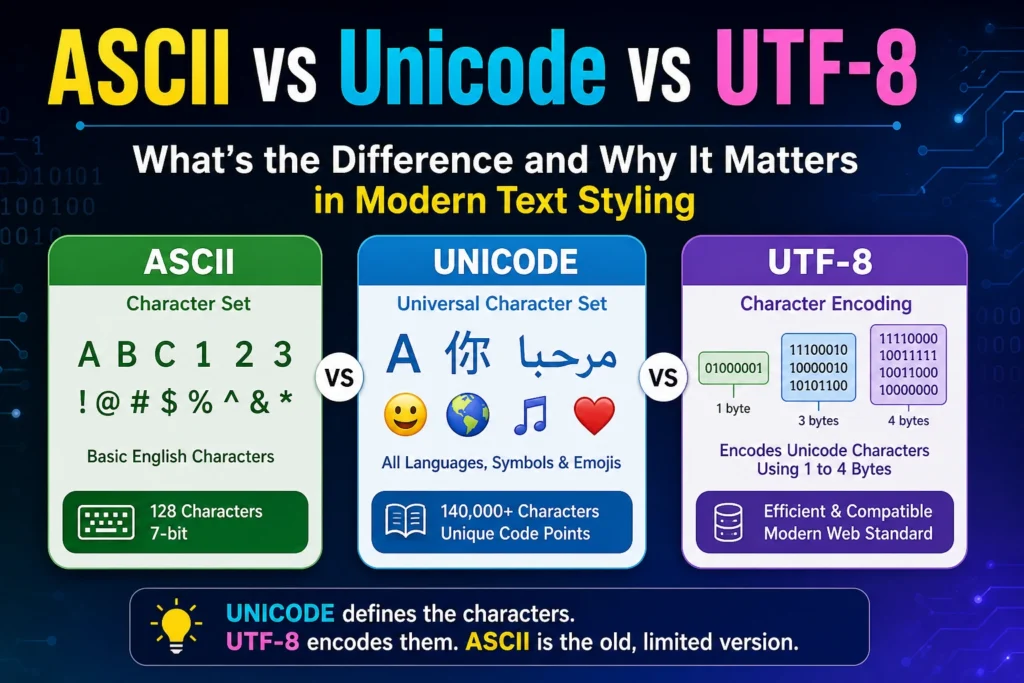
ASCII vs Unicode vs UTF-8
These terms are often mixed together but mean different things.
ASCII
ASCII is a specific character set and encoding covering 128 values.
Unicode
Unicode defines a large collection of characters and assigns each one a code point.
Examples:
A = U+0041
é = U+00E9
€ = U+20AC
UTF-8
UTF-8 is one way to encode Unicode code points into bytes.
So the relationship is:
Unicode defines the character → UTF-8 defines how it becomes bytes
ASCII is a smaller older system whose character range is preserved inside UTF-8.
Is UTF-8 Always Better Than ASCII?
For modern general-purpose text, UTF-8 is usually more capable because it supports Unicode while remaining compatible with ASCII-range text.
However, the important issue for decoding is not simply choosing what is “better.”
You must use the encoding that matches the original data.
If a file was encoded using a specific legacy character set, incorrectly assuming UTF-8 can also cause decoding problems.
Correct interpretation depends on knowing or correctly detecting the actual encoding.
When Should You Use ASCII for Binary to Text?
ASCII is suitable when you know the data contains basic ASCII characters.
Examples include:
- English letters;
- numbers;
- common punctuation;
- spaces;
- simple educational binary exercises.
ASCII Example
Binary:
01000001 01000010 01000011
Result:
ABC
ASCII is especially convenient for learning because each printable character fits into a single byte when represented in an 8-bit format.
When Should You Use UTF-8?
UTF-8 is appropriate when text may contain Unicode characters outside standard ASCII.
Examples include:
- accented letters;
- Arabic;
- Chinese;
- Japanese;
- Korean;
- Cyrillic;
- many mathematical symbols;
- currency symbols;
- emoji.
UTF-8 is also widely used for modern web and software text.
How to Identify ASCII-Only Binary
If every byte begins with:
0
then each byte has a value from 0 through 127.
That means the values fall within the ASCII range.
For example:
01001000 01100101 01101100 01101100 01101111
Every byte begins with 0.
These bytes represent:
Hello
This is valid ASCII and also valid UTF-8.
However, byte values alone do not always tell you the complete intended context, especially when control characters are involved.
How to Recognize Multi-Byte UTF-8 Patterns
UTF-8 uses structured prefixes.
Two-Byte Sequence
Starts with:
110xxxxx
followed by:
10xxxxxx
Three-Byte Sequence
Starts with:
1110xxxx
followed by two:
10xxxxxx
bytes.
Four-Byte Sequence
Starts with:
11110xxx
followed by three:
10xxxxxx
bytes.
Recognizing these patterns can help when inspecting UTF-8 binary manually.
What Is a UTF-8 Continuation Byte?
A continuation byte is a byte that belongs to a multi-byte UTF-8 character after the initial leading byte.
It begins with:
10
For example:
é
is:
11000011 10101001
The first byte:
11000011
indicates a two-byte sequence.
The second byte:
10101001
is the continuation byte.
A continuation byte should not be interpreted independently when it belongs to a valid multi-byte sequence.
Why Character Count and Byte Count Can Differ
With ASCII text, one character generally corresponds to one byte in an 8-bit representation.
With UTF-8, this is not always true.
Consider:
ABC
Characters:
3
UTF-8 bytes:
3
Now consider:
A€
Characters:
2
UTF-8 bytes:
4
Why?
Auses 1 byte.€uses 3 bytes.
So:
2 characters ≠ 2 bytes
This distinction is important when processing multilingual text programmatically.
Binary to Text Conversion Without Spaces
Binary values may appear as one continuous string.
For ASCII text:
0100000101000010
can be divided into:
01000001 01000010
Result:
AB
UTF-8 also works with byte groups, but you must then recognize which bytes combine into individual characters.
For example:
1100001110101001
can first be divided into bytes:
11000011 10101001
Those bytes form one UTF-8 character:
é
Simply splitting into bytes is therefore only the first step.
Common ASCII and UTF-8 Decoding Mistakes
Assuming One Byte Always Equals One Character
This works for ASCII but not for many UTF-8 characters.
Treating Values Above 127 as Standard ASCII
Standard ASCII does not define character values above 127.
Separating UTF-8 Continuation Bytes
A multi-byte UTF-8 sequence must be decoded as one unit.
Confusing Unicode With UTF-8
Unicode assigns code points.
UTF-8 encodes those code points into bytes.
They are related but not identical concepts.
Assuming Extended ASCII Is One Standard
Different legacy 8-bit encodings can assign different characters to values above 127.
Ignoring the Original Encoding
Correct binary data can still decode incorrectly if the wrong character encoding is selected.
How to Choose the Right Encoding
Start with the source of the binary data.
Use ASCII When
- the source explicitly says ASCII;
- the content contains basic English characters;
- the task is a standard ASCII exercise.
Use UTF-8 When
- the source explicitly identifies UTF-8;
- the content includes Unicode characters;
- you are processing modern multilingual text;
- multi-byte UTF-8 patterns are present.
Do Not Guess When Accuracy Matters
If the encoding is unknown, the bytes may not provide enough information to identify it with certainty.
Context, metadata, file headers, protocol rules, or application settings may be needed.
ASCII and UTF-8 Binary Conversion Example
Consider the word:
Café
The first three characters are in the ASCII range:
C:
01000011
a:
01100001
f:
01100110
The final character é requires two UTF-8 bytes:
11000011 10101001
The complete UTF-8 binary is:
01000011 01100001 01100110 11000011 10101001
There are four visible characters but five bytes.
This is a useful example of how ASCII compatibility and multi-byte UTF-8 coexist in the same text.
Frequently Asked Questions
What Is the Main Difference Between ASCII and UTF-8?
ASCII defines 128 values for basic English characters and control codes. UTF-8 encodes Unicode and supports a much larger range of languages, symbols, and emoji while preserving ASCII byte values.
Is ASCII Part of UTF-8?
The ASCII character range is fully compatible with UTF-8. Characters from U+0000 through U+007F use the same byte values in both.
Is Every ASCII File Valid UTF-8?
A byte sequence containing only standard ASCII values is valid UTF-8 because UTF-8 preserves the ASCII range.
Can UTF-8 Use More Than One Byte Per Character?
Yes. UTF-8 uses one to four bytes per Unicode code point. ASCII-range characters use one byte, while many other characters require multiple bytes.
Why Does UTF-8 Binary Sometimes Produce Strange Characters?
The bytes may have been decoded using the wrong encoding, split incorrectly, corrupted, or interpreted as individual characters instead of a valid multi-byte sequence.
Can ASCII Represent Emoji?
No. Standard ASCII does not contain emoji. Emoji are Unicode characters and can be represented using encodings such as UTF-8.
How Do I Know Whether Binary Text Is ASCII or UTF-8?
If all bytes fall within the ASCII range, the text can be valid in both ASCII and UTF-8. Multi-byte UTF-8 patterns or characters outside ASCII indicate that a broader encoding is required. Source information provides the strongest confirmation.
Does Binary to Text Require Knowing the Encoding?
Yes, especially when values extend beyond basic ASCII. The encoding determines how byte sequences map to characters, so using the wrong one can produce incorrect text.
Final Thoughts
Binary to Text conversion is not only about separating zeros and ones into bytes. Those bytes must also be interpreted using the correct character encoding. ASCII is simple and effective for basic English characters, while UTF-8 extends support across the much larger Unicode character set.